ActiveCampaign
Use Meshes to sync contacts, manage list membership, and update tags in ActiveCampaign from product events.
Use the ActiveCampaign integration when Meshes should react to product events by syncing contact data, updating list membership, or managing contact tags. In a Meshes workspace, you create the ActiveCampaign connection, build a rule for the event you care about, and select the action — sync a contact, add or remove a list, or add or remove a tag.
Supported actions
- Add to List adds the contact to a selected ActiveCampaign list.
- Remove from List removes the contact from a selected ActiveCampaign list.
- Add Tag adds a selected tag to the contact.
- Remove Tag removes a selected tag from the contact.
- Sync Contact creates or updates the contact record using mapped fields without adding to a list or changing tags.
Create the connection
- Open Connections in your Meshes workspace.
- Click New Connection.
- Select ActiveCampaign.
- Give the connection a clear name.
- Enter the API URL and API Key from ActiveCampaign.
- Save the connection.
You can find the API URL and API key in ActiveCampaign under Settings > Developer. The API URL must be an https:// URL.
Create a rule
- Open Rules and click New Rule.
- Select the event type that should trigger the ActiveCampaign action, such as
user.signuportrial.started. - Select the resource type for that event.
- Choose your ActiveCampaign connection.
- Select Add to List, Remove from List, Add Tag, Remove Tag, or Sync Contact.
- For list or tag actions, choose the ActiveCampaign list or tag. Sync Contact does not require a list or tag selection.
- Map the event fields Meshes should send to ActiveCampaign.
- Save the rule.
The mapping catalog includes core contact fields such as email, firstName, lastName, and phone, plus the custom contact fields available in the connected ActiveCampaign account.
Send a test event
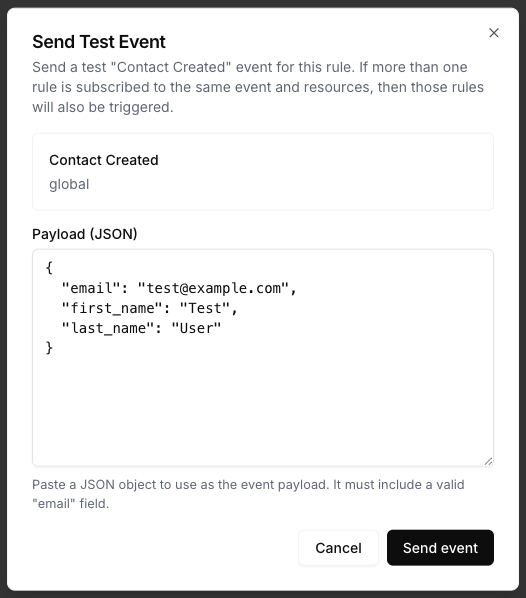
Use Send Test Event on the rule to verify the selected action and mappings.
{
  "email": "test@example.com",
  "first_name": "Test",
  "last_name": "User",
  "plan": "growth"
}
Review results
After the event runs, open Events and inspect the ActiveCampaign delivery details. Meshes shows whether the rule completed, what action ran, and any retries or failures.
Notes
- Map
emailat minimum for ActiveCampaign contact actions. - ActiveCampaign lists and tags are loaded from the connected account.
- ActiveCampaign custom fields are available in the rule mapping catalog.