Meshes: the event-shaped, developer-first embedded iPaaS.
Product reality
See the workflow before you read the pitch
Create a connection, add a rule, send an event, and inspect the outcome. Meshes is most convincing when buyers can see the delivery machinery, not just read about it.
REST API + SDKs
Per-workspace isolation
Delivery logs and replay
15-minute quickstart
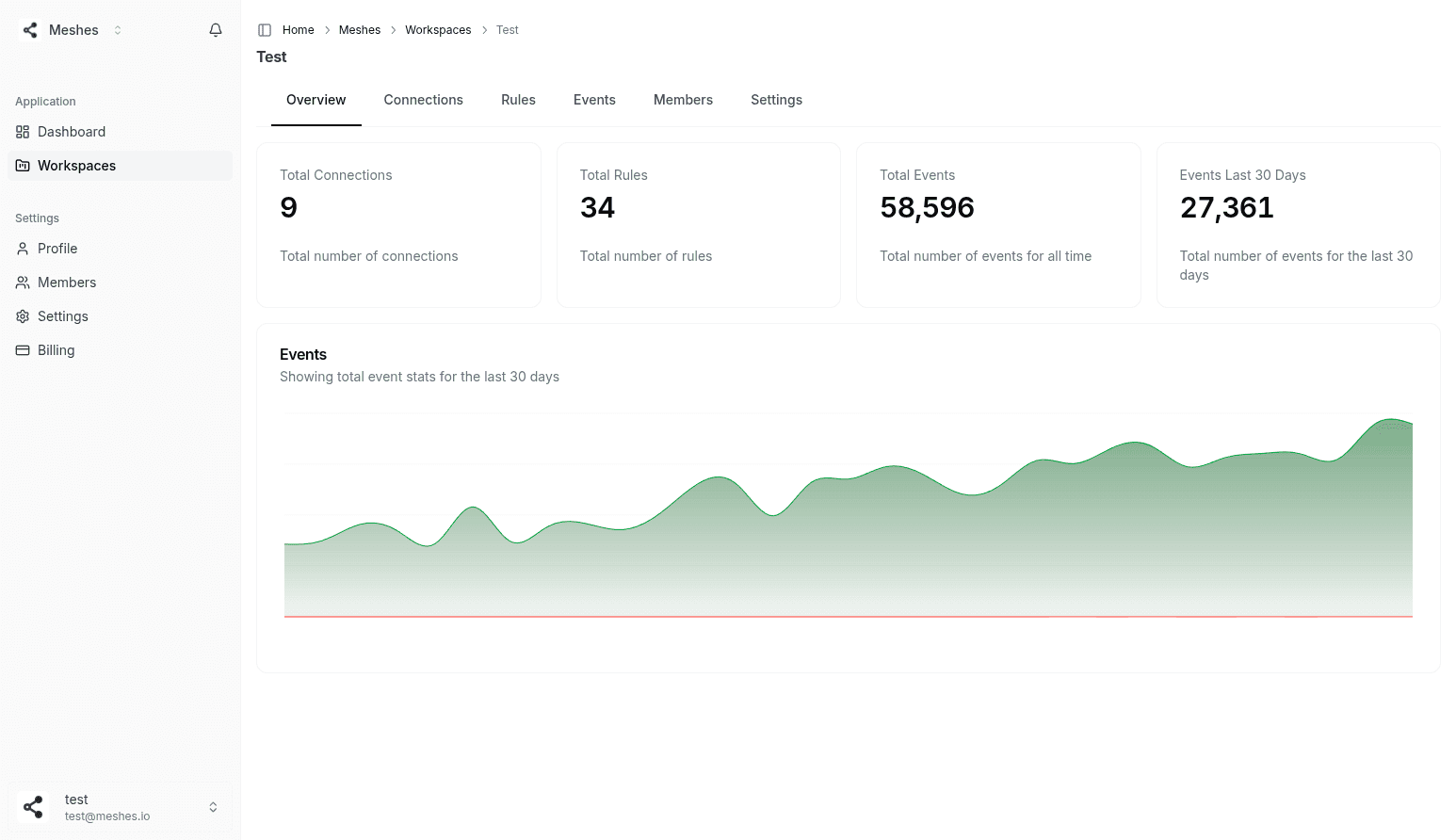
Workspace overview
A real product surface showing connections, rules, and event volume at the workspace level.
What customers are saying
“Our clients wanted their member activity - signups, cancellations, payment issues - to automatically trigger follow-ups in their CRM. Meshes made that possible without us building a custom integration for every tool. It's become one of our most valued features, and we barely have to think about it.”

Mikal Abdullah
CEO & Co-Founder, Billing Logix
Billing Logix uses Meshes to route member activity into customer CRMs without building a separate integration for each downstream tool.

Technical proof
Small integration surface
Emit one event over HTTPS or the SDK instead of maintaining a destination-specific code path for every customer tool.
Workspace isolation
Connections, credentials, rules, and limits stay scoped per workspace for multi-tenant SaaS.
Operational visibility
Inspect per-destination delivery status, failures, retries, dead letters, and replay from one place.
Fast validation path
The quickstart already walks through create connection, create rule, send event, and verify delivery.
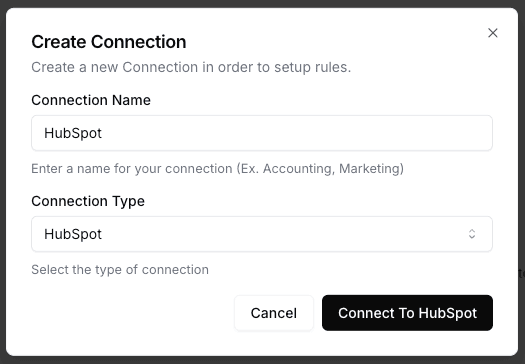
Create a connection
Authorize the downstream tool for a workspace and keep credentials scoped to that tenant.
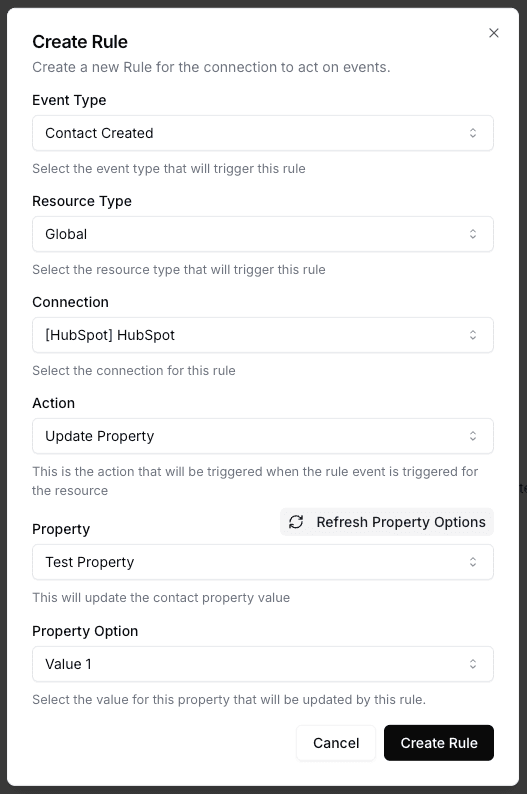
Create a rule
Define which events should trigger which action without baking routing logic into your app.
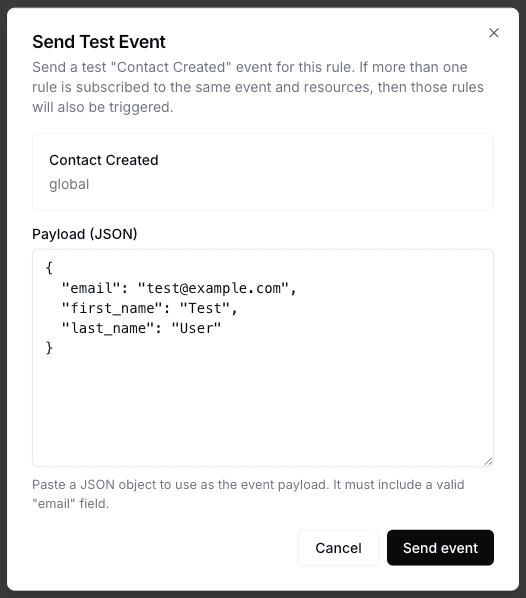
Send a test event
Validate the flow end to end before you point production traffic at it.
How It Works
From one product event to many downstream systems
Your app emits the event once. Meshes handles the routing, operational recovery, and delivery history after that.
1
01
Connect destinations per workspace
Authorize HubSpot, Salesforce, Mailchimp, webhooks, and the other destinations each customer workspace actually needs.
Meshes handles OAuth, API keys, token refresh, and credential storage per workspace so tenant boundaries stay clean.
2
02
Define event types and routing rules
Model the product events you care about and define where they should go without pushing routing logic into your core app.
3
03
Map each event to the right destinations
Set up rules like:
When Contact Created from website, send to HubSpot + Mailchimp.
When Lead Assigned and tier=Pro, notify Salesforce + a webhook.
When Trial Expired, fire an internal webhook only.
Rules run per workspace, so each tenant or environment can have its own routing logic and limits.
4
04
Emit one event and inspect delivery
Your app sends a single event to Meshes. We:
Fan it out to all matching destinations
Handle rate limits with exponential backoff
Retry failures and capture dead letters
Record per-destination status, logs, and metrics
You keep your app focused on product logic and let Meshes own the delivery machinery around it.
Built for customer-facing SaaS integrations
The operational layer behind every customer-facing integration
One event, many destinations
Emit one product event and let Meshes deliver it to every configured CRM, webhook, and downstream system in parallel.
Routing rules instead of branching logic
Define routing per event type and workspace so you can change delivery behavior without adding more conditionals to your app.
Workspace isolation
Keep customers, environments, or regions isolated with dedicated workspaces, each with its own connections, rules, credentials, and limits.
Retries, backoff, and dead letters
When downstream APIs rate-limit or fail, Meshes retries automatically, preserves failure context, and keeps a replay path ready.
Per-workspace credentials
Manage OAuth tokens, API keys, and secrets per workspace so tenant boundaries stay clean without hand-rolled credential plumbing.
Event history, failures, and replay
Search one event and see where it went, what failed, why it failed, and what needs to be replayed.
Integration reliability
The delivery problems Meshes handles
Retries, per-tenant credentials, replay, and support questions are where the real burden of customer-facing integrations shows up.
Common integration pain points
You hand-roll webhooks, queues, workers, and retry logic for every integration.
Every new CRM or destination means another slightly-different code path to maintain.
Rate limits, 500s, and flaky endpoints wake someone up at 2am.
Multi-tenant routing and per-tenant configs end up scattered across tables, flags, and env vars.
Auditing "what happened to this event?" means piecing together logs across services.
With Meshes
One event model and routing layer for all integrations.
Add or change destinations with rules, not new services or queues.
Built-in backoff, retries, and dead-lettering for every connection.
Multi-tenant segmentation via workspaces: each customer or environment gets isolated connections, rules, and limits.
Centralized observability: search an event once and see where it went, what failed, and replay if needed.
Your product should own the event. Meshes should own the delivery machinery around it.
Simple to wire in. Easier to operate.
One event path in the app code. Per-workspace credentials, mappings, and delivery history live in Meshes — so customer-facing integrations stay a dashboard toggle instead of a per-tenant subsystem.
One clean events API
Emit events over HTTPS from any service. SDKs are available, but they are not required.
Typed resources & event types
Model the events and resources you care about once, then reuse them across connections and workspaces.
Rules as data
Change routing in the UI or API without adding more branching logic to your app.
No infra to babysit
No worker fleet, message broker, retry daemon, or log-search layer to maintain.
Fast feedback loops
See exactly what happened to each event, including downstream failures, retries, dead letters, and replay actions.
TypeScript
import MeshesEventsClient from '@mesheshq/events';
const meshesClient = new MeshesEventsClient(
  process.env.WORKSPACE_PUBLISHABLE_KEY!
);

await meshesClient.emit({
  event: 'contact.created',
  payload: {
    email: 'jane@example.com',
    first_name: 'Jane',
    last_name: 'Doe',
    tier: 'pro',
    utm_source: 'google-ads',
  },
});
One event from your product. Meshes delivers it to each workspace's connected destinations — customer-facing or internal — with routing, retries, and delivery history per tenant.
Developer planStart free. Upgrade when rollout gets real.
Start self-serve. Scale when rollout gets real.
Use the Developer plan to prove the event flow, then move up when you need more volume, workspaces, retention, and support.
Popular
Use Cases
Who Uses Meshes?
Designed first for SaaS product teams shipping customer-facing integrations. Useful anywhere a team has outgrown hand-rolled event delivery.
SaaS Product Teams
Ship integrations your customers expect—HubSpot, Salesforce, Mailchimp, webhooks—without turning your app into an integration monolith. Use workspaces to isolate customers, environments, or regions while sharing the same core event model.
Multi-Tenant SaaS
Isolate every customer's integrations in their own workspace without managing separate infrastructure. Meshes gives each tenant independent connections, rules, and event history while you manage everything from a single pane of glass.
Lead Marketplaces
Fan out a single lead to 2, 5, or 10 buyers at once. Deliver via webhooks or directly into CRMs, with retries, backoff, and full audit trails when something fails downstream.
AI Agent Builders
Give your AI agents reliable outbound actions. When an agent decides to send a Slack message, update a CRM, or trigger a workflow, Meshes handles delivery, retries, and observability so your agent code stays focused on reasoning—not plumbing.
RevOps Teams
Let growth and RevOps teams plug in new tools without asking engineering to add another queue or worker. Developers define the events; rules and connections handle the routing.
Internal Platforms
Use Meshes as a central event layer for internal tools, enrichment services, and data pipelines. Keep your products lean while Meshes synchronizes everything around them.
Whatever your integration challenge, Meshes provides the infrastructure so you can focus on building your core product.
FAQ
Common questions before a production rollout
Common questions when teams weigh whether to keep owning the integration layer themselves or hand it off to Meshes.
What changes in our app to use Meshes?
Usually one thing: emit a single event to Meshes instead of wiring each destination directly. Your product keeps the business logic; Meshes handles outbound routing, retries, and delivery behavior after the event leaves your app.
How does Meshes handle multi-tenant SaaS?
Workspaces isolate connections, credentials, rules, limits, and event history. Use them per customer, environment, or region so tenant boundaries stay clean without scattering integration logic across your app.
What happens when a destination is down or rate-limiting?
Meshes retries with backoff, records failure details per destination, captures dead letters when needed, and gives you a replay path once the destination is healthy again.
Can we start with one integration and expand later?
Yes. Many teams start with one event type and one destination, prove the flow, then add more tools and rules without changing the ingestion pattern in their app.
Which destinations do you support today?
Meshes supports the destinations shown across the site and docs today, including HubSpot, Salesforce, Intercom, Mailchimp, Slack, Zoom, Resend, and generic webhooks for custom endpoints.
When should we book a demo?
Book a demo if you are planning a production rollout, need help sizing events and workspaces, or want to pressure-test the design for customer-specific integrations. If you want to validate the flow yourself first, start on the Developer plan.
Ship the integration layer, not the integration backlog
Start on the Developer plan to send your first event. If you are planning a production rollout, book a demo and we will help you pressure-test the design.