• Use Cases
  • Pricing
  • Security
  • Docs
Sign InStart free

The outbound integration layer for SaaS products: emit once, then let Meshes handle routing, retries, fan-out, and delivery history.

© Copyright 2026 Meshes, Inc. All Rights Reserved.

About
  • About
  • Security
  • Blog
  • Contact
  • FAQ
Product
  • Pricing
  • Demo
  • Integrations
  • Guides
  • Changelog
  • Status
Compare
  • All comparisons
  • Build vs buy
  • vs Paragon
  • vs Merge
  • vs n8n
  • vs Zapier
  • vs Make
Use Cases
  • All use cases
  • Embedded CRM sync
  • Per-tenant Slack
  • HMAC webhooks
  • Multi-env workspaces
  • Payment failed
  • User signup fan-out
  • Churn prevention
  • Trial expired events
Developers
  • Documentation
  • Agents
  • Tools
  • API Reference
  • MCP Server
  • llms.txt
Legal
  • Terms of Service
  • Privacy Policy
  • Acceptable Use Policy
  • Cookie Policy

Changelog

What's new in Meshes

April 16, 2026New

Customer.io Integration

Cover Image for Customer.io Integration

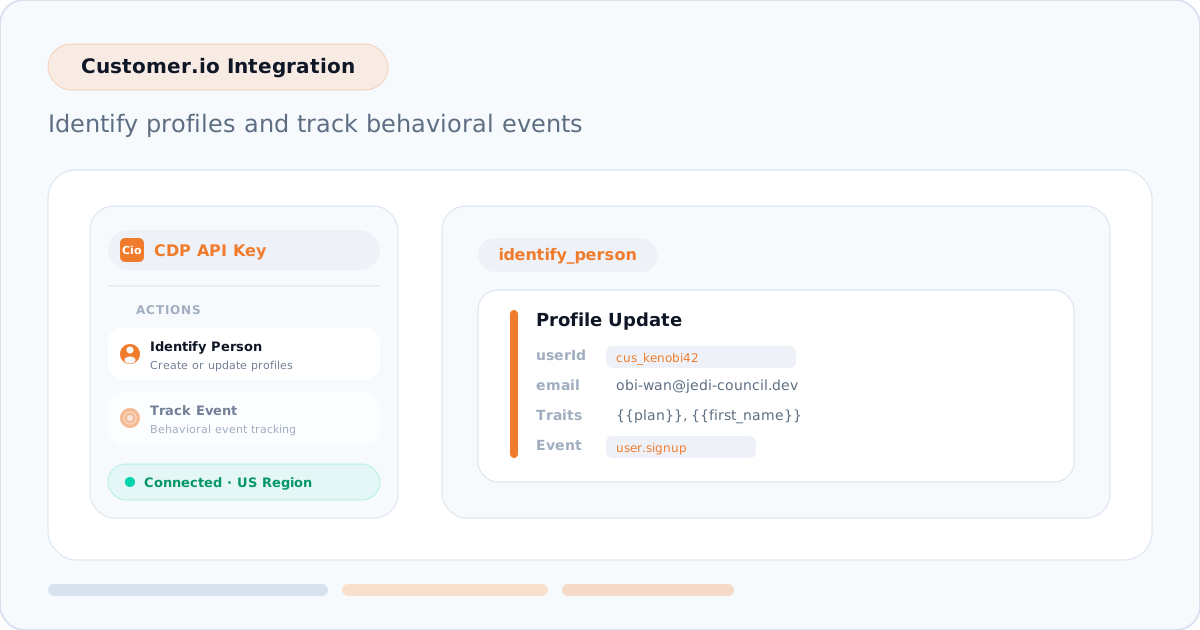
Customer.io is now available as a Meshes destination. Use it to identify people, sync customer traits, and track behavioral events from the product events your app already emits to Meshes.

What it does

The Customer.io integration helps lifecycle, growth, and product teams keep Customer.io profiles and campaigns aligned with real product activity.

  • Identify profiles with userId, email, or anonymousId.
  • Send additional payload fields as Customer.io traits.
  • Track behavioral events with the Meshes event name or an optional event_name_override.
  • Connect with a Customer.io CDP API Key.
  • Choose the US or EU Customer.io region for the connection.

Example workflow

A user.signup event can identify the new profile in Customer.io, attach traits like email, plan, and first_name, and record the signup event so Customer.io campaigns and segments can react to it.

Get started

Create a Customer.io connection, add a rule for the event you want to send, map the identity fields, and use Send Test Event to verify the delivery. See the Customer.io docs for the setup flow and field mapping details.

April 4, 2026New

Discord Integration

Cover Image for Discord Integration

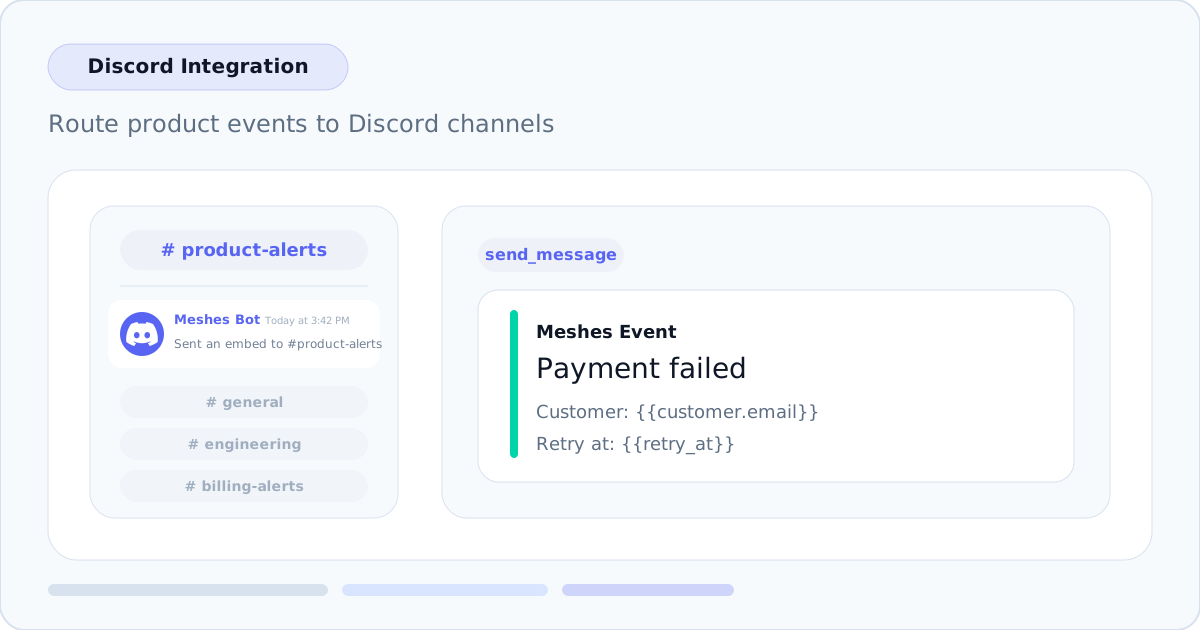
Discord is now available as a connection type in Meshes. Add the Meshes bot to your Discord server, pick the destination channel in the rule builder, configure an embed title and message template, and Meshes handles delivery with retries.

Channel-aware rule setup

Each rule targeting a Discord connection includes a live channel picker backed by the connected server. After the bot is authorized, Meshes loads the available text and announcement channels so you can route each event to the right destination without hardcoded channel IDs.

Embed titles and templated message delivery

Discord rules use a required embed title plus a message template with {{field}} interpolation. When an event fires, Meshes renders the title and body from the event payload and posts a rich embed to the selected channel.

Example rule values:

Title: Payment failed

Template:

Customer: {{customer.email}}
Plan: {{plan}}
Retry at: {{retry_at}}

Templates support nested field access such as {{user.name}}, so Discord notifications can stay concise while still carrying the product context your team needs.

How it works

  1. Connect Discord from the Connections page and authorize the Meshes bot for your server
  2. Create a rule targeting the Discord connection
  3. Select a channel, set the embed title, and write the message template
  4. Meshes renders the embed, delivers it to Discord, and retries transient failures automatically

Discord is the latest supported integration, joining HubSpot, Salesforce, Intercom, Mailchimp, ActiveCampaign, Resend, Zoom, AWeber, MailerLite, Slack, and Webhooks.

April 4, 2026New

SendGrid Integration

Cover Image for SendGrid Integration
March 30, 2026New

ActiveCampaign Sync Contact Action

March 27, 2026New

Webhook Authentication, HMAC Signing, and Delivery Controls

Cover Image for Webhook Authentication, HMAC Signing, and Delivery Controls
March 22, 2026Improvement

Resource-Scoped and Dashboard-Only Embed Sessions

Cover Image for Resource-Scoped and Dashboard-Only Embed Sessions
March 15, 2026New

Embedded Workspaces with Session-Based Access

Cover Image for Embedded Workspaces with Session-Based Access
March 7, 2026New

Slack Integration

Cover Image for Slack Integration
March 6, 2026New

Textarea Field Type for Rule Configuration

March 1, 2026New

Meshes is Live

Cover Image for Meshes is Live

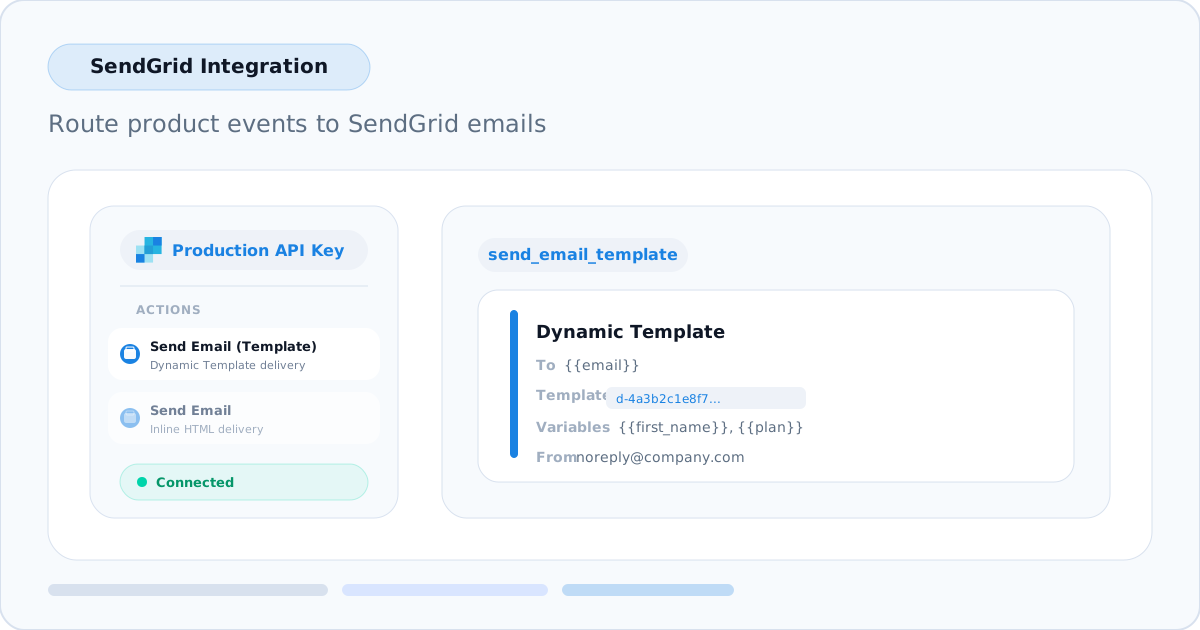
SendGrid is now available as a connection type in Meshes. You can connect a SendGrid account with an API key, select a Dynamic Template in the rule builder, or send an inline HTML email directly from the event that should trigger the message.

This integration supports two actions: Send Email (Template) for SendGrid Dynamic Templates and Send Email for inline HTML delivery. That means welcome emails, trial onboarding prompts, billing confirmations, and other transactional sends can all run from the same product events you already route to the rest of your stack.

No custom SendGrid worker is required. Create the connection in Connections -> New Connection -> SendGrid, add a rule for the event you care about, map email plus any template_variables you need, and Meshes handles the delivery path.

ActiveCampaign connections now support a Sync Contact action alongside the existing list and tag actions.

Sync Contact creates or updates the contact record in ActiveCampaign using the fields mapped in your Meshes rule. Unlike the list and tag actions, it does not require selecting a target list or tag — the mapped fields are the entire operation. This is useful when the goal is keeping contact data current without triggering list-based or tag-based automation.

When to use it

  • Keep ActiveCampaign contact properties up to date from product events without subscribing the contact to a list.
  • Upsert contacts with custom field values before a separate rule handles list or tag assignment.
  • Sync profile data like name, phone, or custom fields from events where the only goal is a contact record update.

How it works

  1. Open Rules and create a new rule.
  2. Select your ActiveCampaign connection and choose Sync Contact.
  3. Map the event fields to ActiveCampaign contact fields. The mapping catalog includes core fields (email, firstName, lastName, phone) and custom fields from the connected account.
  4. Save the rule and send a test event to verify the contact is created or updated.

email is required for all ActiveCampaign contact actions, including Sync Contact.

Learn more

  • ActiveCampaign integration docs
  • Integrations overview

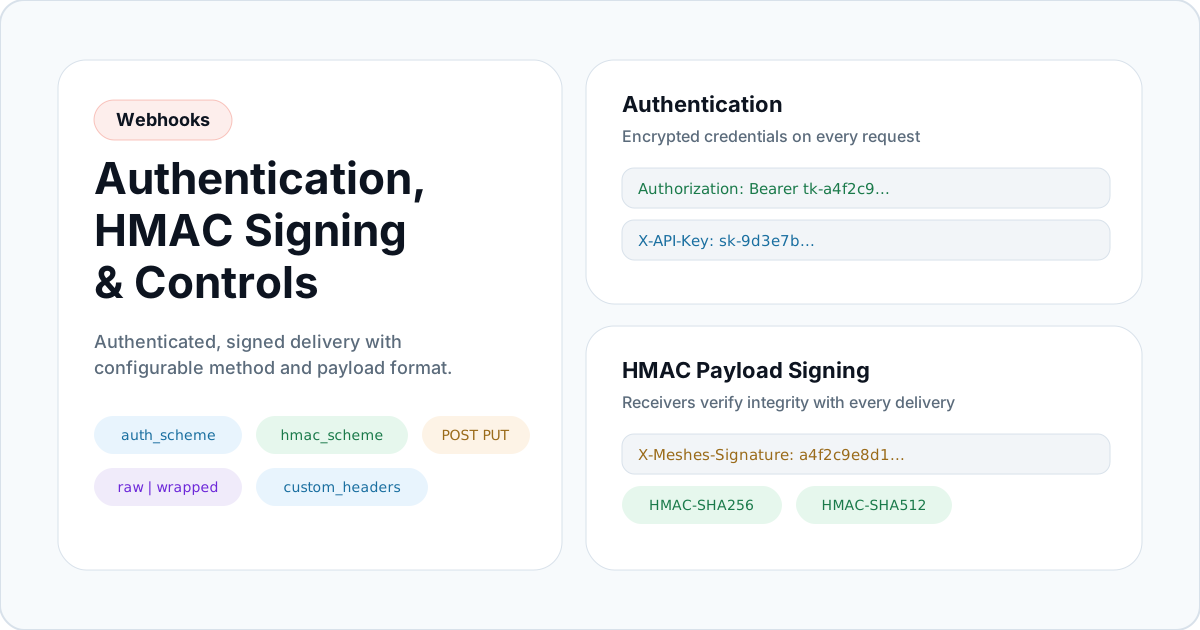
Meshes webhooks are no longer config-only. Every webhook connection now supports authenticated, signed delivery with full control over how the request reaches your endpoint.

Authentication

Attach credentials to every webhook request. Choose from:

  • None — no auth headers
  • Basic Auth — Authorization: Basic header from a username and password
  • Bearer Token — Authorization: Bearer header
  • Custom Header — any header name and value, such as X-API-Key

All credentials are encrypted at rest and never returned in plaintext after they are saved.

HMAC payload signing

Enable HMAC-SHA256 or HMAC-SHA512 so your endpoint can cryptographically verify that every request body came from Meshes and has not been tampered with. The signature is computed from the exact bytes sent and attached in a configurable header (default X-Meshes-Signature). Signing is independent of authentication — use both together for defense in depth.

Custom headers

Add up to five static headers to every request for routing keys, tenant identifiers, or any metadata your endpoint expects.

Payload format

Choose Wrapped to send the full Meshes event envelope, or Raw to send only the payload object. In raw mode, event metadata is promoted to X-Meshes-* HTTP headers so your endpoint can still access the event ID, name, resource, and timestamps.

HTTP method

Select POST, PUT, or PATCH per connection. The default is POST.

Learn more

  • Webhook integration docs
  • Integrations overview

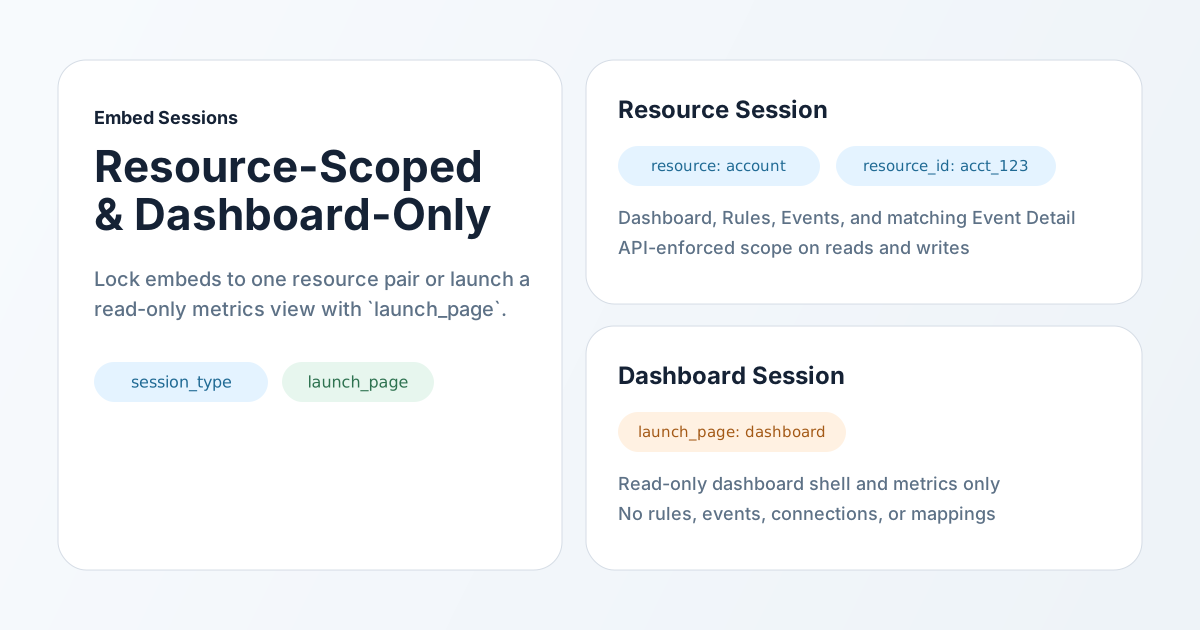
Meshes embed sessions now support two new additive access shapes on top of the existing workspace session model.

What is new

  • Resource sessions lock the iframe to one resource + resource_id pair
  • Dashboard sessions expose a read-only dashboard-only embed
  • launch_page replaces raw launch paths with a small initial-page enum
  • Server-side enforcement now keeps resource and dashboard sessions constrained even when a token is used directly against the API

What resource sessions can do

  • launch into dashboard, rules, or events
  • view only in-scope rules and events
  • create rules and emit or retry events only inside the locked resource scope
  • open matching Event Detail when the event belongs to that resource pair

What dashboard sessions can do

  • launch into dashboard
  • read dashboard shell data and dashboard metrics
  • stay read-only and dashboard-only

What changed for integrators

  • use launch_page instead of raw route strings
  • choose session_type when minting a session
  • send resource and resource_id only for resource sessions

Learn more

  • Embed overview
  • Session API overview
  • Workspace pages available in embed

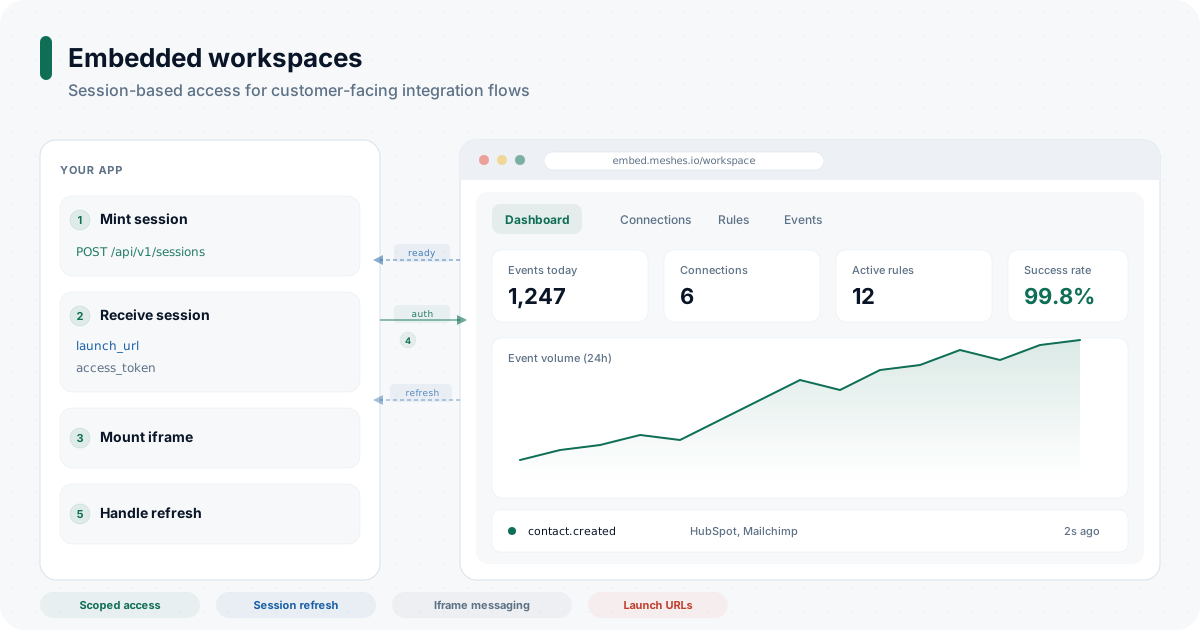
You can now embed key Meshes workspace pages directly inside your own product with session-based access and an iframe-ready launch flow.

This release adds a new embedded workspace surface for teams that want to expose integrations to their own customers without sending them to a separate admin app. Your backend mints a short-lived session, your frontend mounts the returned launch_url, and the embedded experience handles refresh, navigation, and resizing through a small postMessage contract.

What is included

  • Embedded workspace pages for dashboard, connections, rules, events, event detail, and connection mappings
  • Session minting and refresh with POST /api/v1/sessions and POST /api/v1/sessions/:sessionId/refresh
  • Launch URLs for iframe bootstrap
  • Iframe messaging for ready, auth, refresh, expired, navigation, and resize events
  • Scoped payload access with the events.payload:read session scope

What this unlocks

  • expose customer-specific integration settings inside your own app
  • keep access scoped to a single Meshes workspace
  • refresh embedded access without remounting the entire iframe
  • handle iframe height and token refresh from your host app

Typical integration flow

  1. your backend mints a session for the correct workspace
  2. your frontend mounts the returned launch_url
  3. the iframe sends meshes:ready
  4. your frontend sends meshes:auth with the current access_token
  5. your frontend refreshes the session when the iframe asks for a new token

Learn more

  • Embed overview
  • Embed quickstart
  • Session API overview
  • Iframe message contract

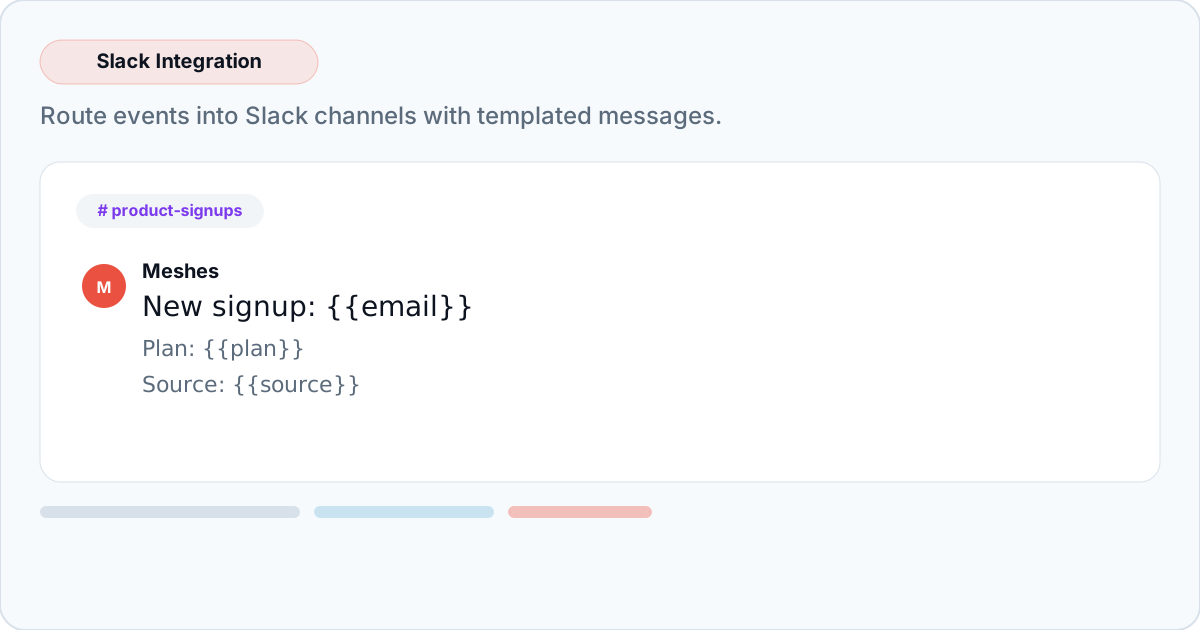
Slack is now available as a connection type in Meshes. Connect your Slack workspace via OAuth, pick a destination channel, configure a message template, and Meshes handles delivery with retries.

Templated messages

Each rule targeting a Slack connection includes a message template with {{field}} interpolation. When an event fires, Meshes renders the template with the event payload and posts to the configured channel.

Example template:

🎉 New signup: {{email}}
Plan: {{plan}}
Source: {{source}}

Templates support Slack markdown formatting and nested field access via dot notation (e.g., {{user.name}}). Missing fields render as empty strings rather than broken template syntax.

How it works

  1. Connect your Slack workspace from the Connections page
  2. Create a rule targeting the Slack connection
  3. Select a channel and write your message template
  4. Meshes routes matching events to Slack with automatic retries

Slack is the latest supported integration, joining HubSpot, Salesforce, Intercom, Mailchimp, ActiveCampaign, Resend, Zoom, AWeber, MailerLite, and Webhooks.

Rule actions now support a textarea field type for multiline input. This powers Slack's message template editor and is available for any integration that needs multiline configuration in rule setup.

Previously, rule action fields only supported single-line text and password inputs. The new textarea type renders a resizable monospace text area in the rule configuration form - useful for templates, message bodies, or any structured text input.

This is a platform-level change, not specific to Slack. Any integration can now define a kind: "field" action data entry with type: "textarea" and get multiline input in the rule form automatically.

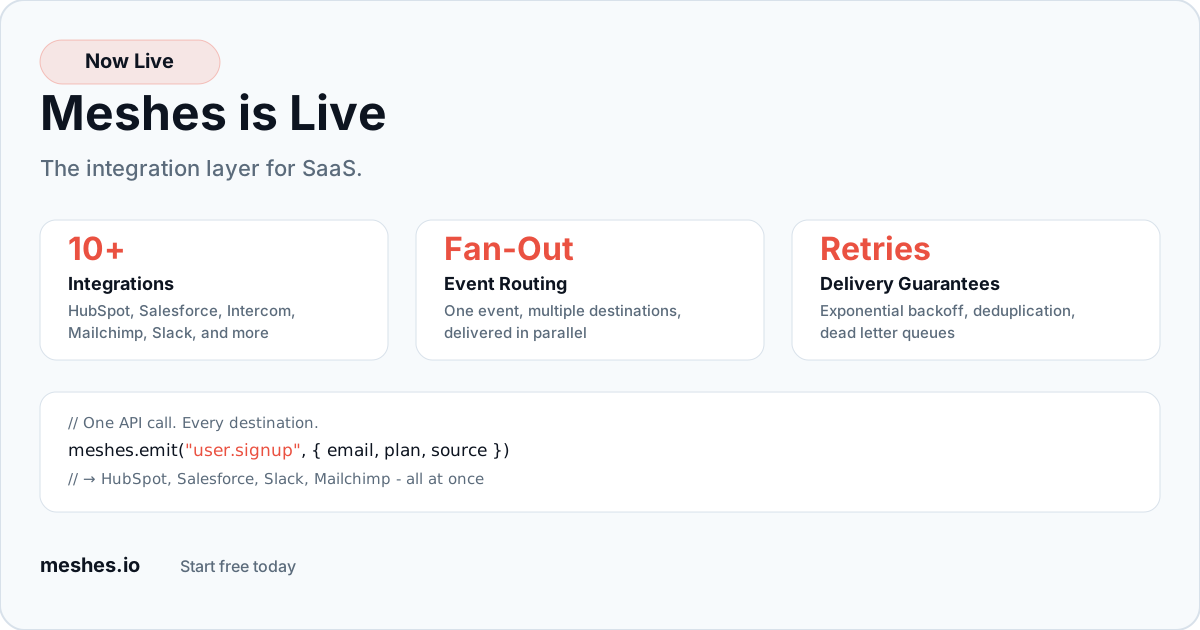
Meshes is now live with paid plans. Send product events from your app and route them to HubSpot, Salesforce, Intercom, Mailchimp, ActiveCampaign, Resend, Zoom, AWeber, MailerLite, and custom webhooks — with retries, deduplication, and delivery guarantees built in.

What you get

  • Fan-out routing — one event, multiple destinations, delivered in parallel
  • Automatic retries — exponential backoff with jitter, dead letter queues for failures
  • Field mappings — transform event payloads into the format each destination expects
  • Multi-tenant workspaces — isolate connections, rules, and credentials per customer
  • 10 integrations — CRMs, email platforms, messaging tools, and webhooks

Getting started

Sign up at meshes.io and send your first event in minutes. The Developer tier is free — 100 events/month, 1 workspace, 3 connections. Card required to activate your account.

Paid plans start at $49/mo (Builder) with annual pricing available with 2 months free.