Per-Attempt Visibility on Event Deliveries
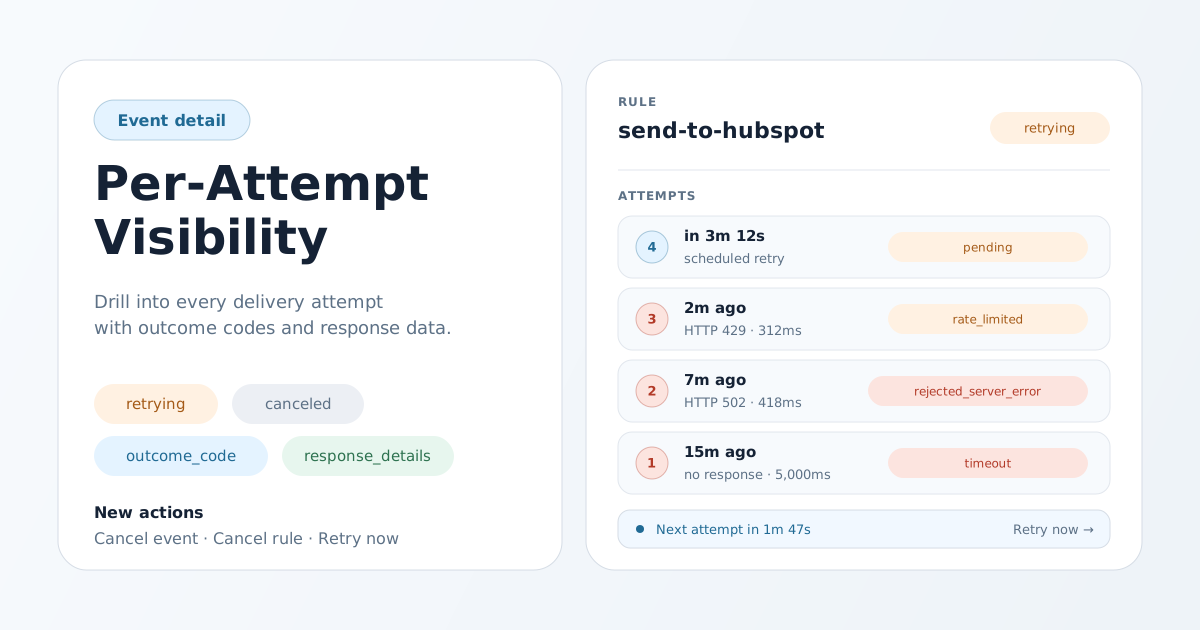
When a product event lands in a destination, you should know exactly what happened — not just whether it ended up green or red. This release turns every event in Meshes into a full delivery story, attempt by attempt, with the controls to act on what you find.
Every attempt, in context
Open any event in the dashboard and each routing rule now expands inline to show the full attempt history. You can see the order things happened in, how long each attempt took, what the destination said, and which attempt finally succeeded or what is still being retried. Failed attempts that captured a response from the destination expose that response on demand, so debugging a flaky webhook or a misconfigured CRM no longer means digging through your own logs to figure out what Meshes saw.
Outcomes that explain themselves
Attempts now carry a structured outcome — delivered, rate limited, auth failure, timeout, server error, and others — so you can tell apart a transient destination blip from a credential problem from a mapping mistake at a glance. The same outcome flows through the API, so dashboards, automations, and support tooling can react to specific failure modes instead of treating every red row the same. The full list of outcome codes is in the API reference.
Status that tells you what to expect
Event and rule status now distinguishes work that is actively being retried from work that has stopped. Retrying means a previous attempt failed but Meshes will try again; canceled means delivery has been stopped on purpose and will not resume. Combined with the new countdown that shows when the next attempt will fire, you always know whether an event is making progress or sitting still.
Take action without leaving the page
Two new controls live directly on the event detail page:
- Cancel stops further delivery for one rule or for the whole event in a single click. In-flight requests are allowed to finish; nothing new is scheduled afterward.
- Retry now fires the next attempt immediately for a rule that is in a retry loop, so you can confirm a fix without waiting for the next scheduled backoff.
Both actions require workspace edit permission. Per-rule cancel and retry-now are available in embedded Meshes experiences your customers see in your own product; event-scope cancel stays inside your team's own dashboard.
Why this matters
- Support gets faster. Front-line teams can answer "did our event reach HubSpot?" without escalating to engineering.
- Customers trust the integration. When something does go wrong, the dashboard shows exactly which attempt failed, why, and when the next one will run.
- You stay in control. A bad destination, a stuck rule, or a runaway retry no longer requires a deploy or a support ticket — it is a click on the event detail page.