When Customer Integrations Fail: A Support Triage Runbook
A customer says their CRM, messaging, or email integration stopped working. This support runbook helps SaaS teams find the affected workspace, classify the failure, recover safely, and know when engineering is actually needed.
The support ticket is rarely specific.
“Our Salesforce integration is broken.”
That sentence does not say whether the customer disconnected Salesforce, the product never emitted the event, no rule matched, a field mapping produced an invalid value, the destination rate-limited the request, or the delivery succeeded and the customer looked for the wrong record.
Without a runbook, support forwards the ticket to engineering. Engineering asks for a customer ID and timestamp. Support asks the customer. The customer repeats that the integration is broken. A problem that should take minutes becomes an afternoon of handoffs.
Customer integration troubleshooting is the process of identifying the affected customer scope, locating the expected event and destination delivery, classifying the latest outcome, and choosing the smallest recovery action that can restore the workflow safely. A useful support triage runbook makes those steps possible without handing support raw infrastructure logs or requiring an engineer for every expired credential and invalid field.
The objective is not to turn support into an integration engineering team. It is to give them enough evidence to answer four questions:
What failed?
Why did it fail?
Is it already recovering?
What is the smallest safe action now?
The support triage contract
A customer-facing integration needs an operational surface, not just a green “Connected” badge.
At minimum, support should be able to move through four levels of evidence:
Level
Evidence
Question it answers
Customer scope
Workspace, account, and environment
Which customer workflow is affected?
Connection
Destination, connection state, and last known activity
Can the customer authorization or endpoint still be used?
Delivery
Event, rule, action, destination, and current status
Did the expected path run?
Attempt
Timestamp, outcome class, safe response details, and retry state
Why did the latest attempt fail, and what happens next?
This is the support triage contract: every ticket must be traceable from customer to connection to delivery to attempt.
Raw application logs do not satisfy the contract. They mix customers, contain unrelated noise, may expose sensitive payloads, and usually describe what code executed rather than what happened to one customer workflow. Support needs a scoped operational view with stable identifiers and redacted evidence.
That view should make the next action obvious. An expired authorization needs reauthorization. A rate limit usually needs time. An invalid mapping needs a configuration fix. A provider outage needs monitoring and bounded retries. A successful destination response needs investigation after the delivery boundary.
Five facts to collect before changing anything
Do not begin with the error message. Begin with scope.
Ask for five facts:
Customer or workspace: Which tenant owns the connection?
Environment: Is the report about production, staging, or another workspace?
Expected event: Which product action should have triggered delivery, such as account.upgraded or trial.ending?
Expected destination action: What should have happened in the CRM, messaging tool, email platform, or webhook endpoint?
Approximate time and resource: When did it happen, and which customer, account, subscription, or other resource was involved?
Use internal identifiers when they are available: workspace ID, event ID, connection ID, rule ID, and resource ID. Do not ask the customer to paste access tokens, API keys, authorization codes, or full production payloads into a support ticket.
These facts prevent the most common triage mistake: investigating the correct symptom in the wrong customer scope or environment.
The seven-step integration failure runbook
1. Confirm the workspace and connection
Open the customer workspace and verify the expected connection exists.
Check:
destination type;
connection name;
active or inactive state;
whether the customer recently reauthorized or replaced the connection;
whether the rule points to this connection rather than an older one.
An inactive connection narrows the incident immediately. If the saved authorization is no longer usable, follow the documented reauthorization path and preserve the existing connection when the product supports it. Replacing the connection unnecessarily can leave rules and field mappings attached to the old configuration.
If the connection is active, do not assume it is healthy. “Active” can mean the connection is configured; the delivery attempts show whether it is completing current work. The OAuth connection monitoring runbook covers the additional signals that distinguish one successful authorization from ongoing connection health.
2. Locate the expected event
Search event history using the approximate time, event name, resource ID, or known event ID.
There are two materially different outcomes:
The event exists. Continue to the matched rules and destination deliveries.
The event does not exist. Verify the source application emitted it to the correct workspace and environment with the expected event name.
Do not debug a destination before confirming the source event reached the integration layer. If the event is absent, changing the CRM mapping or reauthorizing the destination cannot restore it.
If the source uses an idempotency key, also check whether an earlier event already claimed that key. The correct fix may be at the emission boundary rather than the destination.
3. Inspect the matched rules
An accepted event does not guarantee every expected destination path ran.
Verify:
which rules matched the event name;
whether rule conditions matched the payload;
which connection and action each rule selected;
whether the rule was enabled at the time;
whether another destination for the same event succeeded.
No matched rule is a routing or configuration issue, not a delivery failure. A rule that matched but never reached the intended connection points to a stale connection reference, an unexpected condition, or an incorrect action.
This distinction matters in fan-out. If account.upgraded reached Slack but failed in HubSpot, the parent event is not the unit to replay. The HubSpot delivery is. Partial failure recovery should preserve the successful Slack path and operate only on the failed destination.
4. Read the latest attempt before reading every attempt
The newest attempt answers the immediate question: what state is the delivery in now?
Then use the earlier attempts to determine whether the failure is:
stable, with the same outcome every time;
recovering, with a newer success after earlier failures;
changing, with one error class giving way to another;
or intermittent, with success and failure alternating.
A delivery that is already retrying should usually be observed, not manually retried again. A delivery that failed repeatedly with the same validation error will not improve because another identical request is sent faster.
Attempt history turns one error into a sequence. That sequence is often the difference between “wait” and “change something.”
In Meshes, the Events UI keeps that sequence attached to the matched rule. Support can read the status of each destination, open its attempt history, and compare granular outcomes without leaving the customer workspace.
5. Classify the outcome
HTTP status codes provide useful transport vocabulary, but they are not a complete support decision. The HTTP semantics specification distinguishes authentication, permission, missing-resource, client, and server errors. Provider APIs then add their own codes and response bodies. For example, a Salesforce delivery can fail because of expired authorization, refused access, a missing resource, invalid data, a rate limit, or a server failure.
Normalize those details into a small set of outcomes support can act on:
Outcome
Likely meaning
Support response
auth_failed
Authorization is invalid, expired, revoked, or insufficient
Reauthorize or correct permissions, then verify the existing connection
rate_limited
The destination is temporarily refusing additional requests
Let scheduled recovery proceed; confirm the failure is scoped and avoid a manual retry burst
validation_failed
The destination rejected one or more values
Inspect safe response details, correct the payload or field mapping, and test again
mapping_error
The configured transformation could not produce the destination input
Correct the mapping, send a test event, and retry only the failed path
destination_not_found or destination_gone
A referenced list, channel, object, endpoint, or other resource is unavailable
Confirm the resource still exists and update the connection or rule configuration
destination_conflict
The request conflicts with destination state
Determine whether the intended state already exists before retrying
payload_too_large
The destination rejected the request size
Reduce or reshape the configured payload before testing again
destination_timeout, timeout, or network_error
The result is uncertain or the destination could not be reached
Observe automatic retries and preserve idempotency before manual recovery
rejected_server_error
The destination failed while processing an otherwise reachable request
Monitor provider recovery and retry within the configured policy
internal_error
The failure cannot be resolved from customer configuration alone
Escalate with the scoped evidence packet
delivered
The destination accepted the action
Verify the expected destination object, action, account, and downstream visibility
Meshes makes that normalization visible on every delivery attempt, so support can work from a stable outcome code while retaining safe provider details for context.
Rate limits deserve special care. RFC 6585 defines 429 Too Many Requests and allows the response to include Retry-After. A manual “retry now” loop can work directly against that recovery signal. The HubSpot integration docs show where delivery retries and failures appear after a rule runs.
Likewise, a permission failure should not be retried indefinitely with the same credentials. The response must change—through reauthorization, scope correction, destination permissions, or configuration—before another attempt has a reason to succeed.
6. Choose the smallest safe recovery
Recovery should operate at the smallest failed scope.
Use this order:
Observe when automatic recovery is already running for a transient failure.
Reauthorize when the connection cannot authenticate or lacks required permission.
Correct configuration when a rule, action, destination resource, or mapping is wrong.
Send a test event through the repaired rule to prove the current configuration.
Retry the failed destination delivery after the test succeeds.
Re-emit deliberately when the delivery has exhausted its allowed attempts and cannot be retried in place.
Escalate when the outcome points outside customer-controlled configuration or the evidence remains contradictory.
Do not re-emit the original product event merely because one destination failed. In Meshes, Retry now is the destination-scoped recovery while the failed delivery remains eligible. Once its allowed attempts are exhausted, Re-emit creates a new event and evaluates the active rules again. Review the full destination set and the duplicate safety of every action before proceeding; select Also cancel remaining attempts when non-terminal deliveries on the original event should be canceled after the replacement is accepted. In-flight requests cannot be aborted.
Uncertain outcomes need the same caution. A timeout does not prove the destination performed no work. Preserve the original idempotency context and use a recovery path designed to tolerate a late or duplicated attempt.
7. Verify the customer outcome and close the loop
A green retry button is not the end of the incident.
Verification should answer:
Did the repaired test event succeed?
Did the original failed destination delivery recover?
Did already-successful destinations remain untouched?
Is the intended record, message, subscriber, or webhook request visible in the correct destination account?
Is the customer-facing workflow healthy for a new representative event?
Close the ticket with a short factual timeline: affected scope, failure class, corrective action, verification evidence, and whether follow-up is required. Do not paste secrets or full payloads into the summary.
A worked support ticket
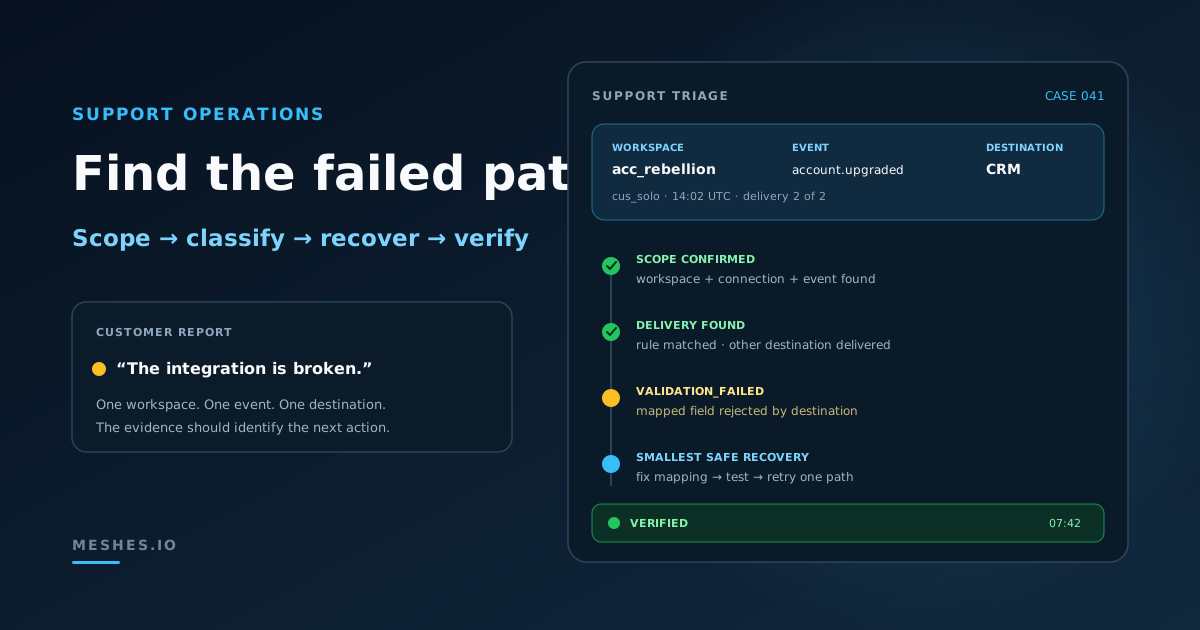
Consider a fictional customer workspace in Meshes, acc_rebellion.
The customer reports that account.upgraded did not update a contact in HubSpot. Support collects the affected customer ID, cus_solo, and an approximate time.
The triage sequence is:
The acc_rebellion HubSpot connection is present and active.
Event history contains the expected account.upgraded event for cus_solo.
Two rules matched: a Slack notification and a HubSpot contact update.
The latest safe response detail identifies a mapped property value the destination rejected.
A teammate with mapping permission corrects that field mapping.
Send Test Event succeeds through the HubSpot rule.
Support retries only the failed HubSpot delivery.
The attempt becomes delivered, and the contact update is visible in the intended HubSpot account.
The incident never required a global replay, a new OAuth connection, or a retry to Slack. It required one mapping correction and one scoped recovery.
The same sequence also produces a useful customer response: the product event was received, one destination succeeded, one destination rejected a mapped value, the mapping was corrected, and the failed destination was recovered without repeating the successful action.
The engineering escalation packet
Some failures need engineering. The runbook should make that escalation faster rather than merely delaying it.
Include:
Field
Why it matters
Workspace or account ID
Establishes the customer scope
Environment
Prevents production and test traffic from being mixed
Connection ID and destination type
Identifies the authorization and provider boundary
Event ID, event name, and resource ID
Identifies the source work item
Rule ID and action
Identifies the failed destination path
First and latest attempt timestamps
Establishes duration and sequence
Parent, delivery, and attempt status
Separates global, destination, and request state
Outcome code and safe provider code
Preserves the actionable failure class
Sanitized response summary
Adds evidence without copying sensitive payloads
Recovery already attempted
Prevents repeated or conflicting actions
Customer impact
States whether one event, one workspace, or several customers are affected
In Meshes, this evidence is already organized by workspace, event, matched rule, delivery, and attempt. The escalation packet becomes a summary of customer-scoped facts instead of a reconstruction across disconnected logs and teams.
Escalate immediately when the same unexplained failure appears across unrelated workspaces, an internal_error persists, visible state contradicts the recorded delivery result, or support lacks permission for the required action.
Do not escalate only “Salesforce is broken.” Escalate a bounded problem with a stable identity and a reproducible sequence.
Metrics that improve the runbook
Ticket volume alone does not show whether integration support is improving.
Track:
Time to scope: how long it takes to identify the workspace, connection, event, and rule.
Time to classify: how long it takes to assign an actionable outcome class.
Time to recover: how long it takes to restore the failed customer workflow.
Support resolution rate: the percentage of integration tickets resolved without engineering.
Safe recovery rate: the percentage of retries that recover the failed path without repeating successful work.
Reauthorization completion rate: how often customers complete the recovery flow after an auth failure.
Recurrence rate: how often the same customer and failure class return after closure.
Review recurring tickets by outcome, destination, action, and customer workflow. Ten “integration broken” tickets may represent one unclear mapping error, one provider permission change, and eight tickets caused by missing support evidence. The fixes are different.
A support-readiness test before launch
Before releasing a customer-facing integration, give a support teammate only:
a customer or workspace identifier;
an event name;
a resource identifier;
and an approximate time.
Ask them to find the connection, locate the event, identify the matched rule, classify the failed attempt, select the safe recovery, and explain the result to the customer.
The integration is not operationally ready if the exercise requires database access, unrestricted raw logs, secrets from the customer, or an engineer who remembers how the connector works.
Meshes puts this exercise inside the customer workspace: Connections establishes the authorization and configuration, while Events exposes matched rules, per-destination status, attempt history, outcome codes, and safe recovery controls. Failure visibility is only proven when the person expected to operate it can resolve a realistic incident; the broader embedded integration platform evaluation provides the surrounding buyer checklist.
Customer integration triage in Meshes
Meshes workspaces keep each customer's connections, rules, event history, and delivery state in one scope. The Events UI connects the parent event to every matched rule and the full attempt history for each destination. Granular outcomes such as auth_failed, rate_limited, validation_failed, and destination_not_found keep different recovery decisions from collapsing into one generic error.
Support can see whether a destination is retrying, inspect safe failure response data, retry or cancel rules still in flight, and use Send Test Event to verify a repaired connection, action, or field mapping before live traffic depends on it. The operational path stays customer-scoped: connection, event, destination delivery, attempt, recovery.
That is what turns “the integration is broken” from an engineering interruption into a support workflow.
Frequently asked questions
What should support check first when a customer integration fails?
Confirm the affected workspace, environment, connection, expected event, destination action, approximate time, and resource. Then determine whether the event exists before investigating destination delivery.
When should support retry a failed integration delivery?
Retry after the failure condition has cleared or the configuration has changed. Let automatic recovery handle active transient failures, test repaired configuration first, and retry only the failed destination path when other destinations already succeeded.
What belongs in an integration escalation?
Include workspace, connection, event, rule, attempt timestamps, statuses, outcome code, sanitized response details, actions already taken, and customer impact. Never include tokens, secrets, or unrestricted production payloads.
Give support a customer-scoped path from failure to verified recovery.Join Meshes for workspace-scoped connections, event history, per-destination delivery status, and safe retry controls in one place.