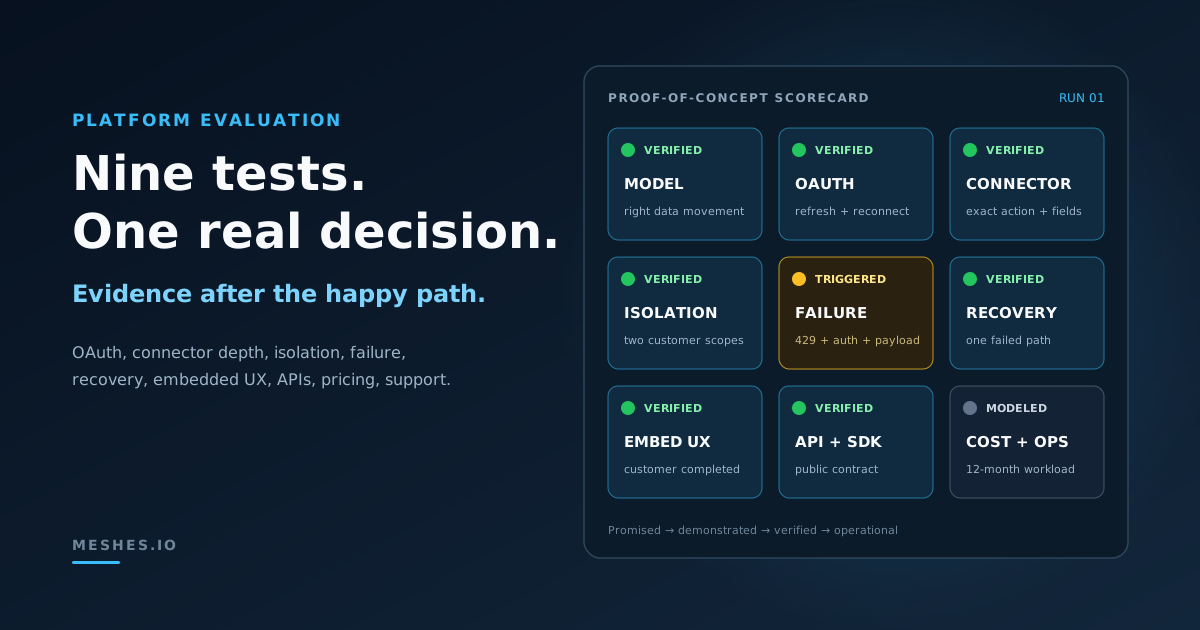
How to Evaluate an Embedded Integration Platform: 9 Tests Before You Commit
Connector catalogs and feature grids make embedded integration platforms look interchangeable. A useful evaluation puts one real customer workflow through authentication, configuration, failure, recovery, and pricing before the platform becomes part of your product.
Every embedded integration platform looks capable during a polished demo.
The connector catalog is large. OAuth opens in a new window. A workflow runs. A green checkmark appears. That proves the happy path works once.
It does not prove that the platform fits your product.
Evaluating an embedded integration platform means testing the customer-facing integration model, not counting features. Use a real customer workflow to verify authentication lifecycle, connector depth, tenant isolation, failure visibility, scoped recovery, embedded UX, public APIs, realistic pricing, and support handoff. The best platform is the one that passes the tests your product actually needs — not the one with the longest catalog.
That distinction matters because “embedded integrations” can describe several different products:
an outbound event-delivery layer;
a bidirectional data-sync platform;
a unified API across one software category;
a visual workflow builder embedded in your app;
or a broader embedded iPaaS that combines several of those models.
Choosing between them before defining the required model is how teams buy a powerful platform and still end up building the missing half themselves.
The nine-test evaluation matrix
Run the same proof of concept against every serious candidate.
Test
Question the evidence must answer
1. Integration model
Does the platform solve the direction and shape of data movement your product needs?
2. OAuth lifecycle
Can a customer connect, refresh, revoke, fail, and reconnect without an engineering rescue?
3. Connector depth
Does the connector support the exact objects, actions, fields, and scale your workflow requires?
4. Customer isolation
Can two customers configure the same integration differently without data or credentials crossing boundaries?
5. Failure visibility
Can an operator identify the failed customer, destination, attempt, and safe response detail?
6. Scoped recovery
Can one failed path recover without repeating successful side effects?
7. Embedded UX
Can customers configure and troubleshoot the integration inside the product experience you intend to ship?
8. API and SDK fit
Can your team automate the integration lifecycle through documented public interfaces?
9. Pricing and support
Does the cost remain predictable, and can support resolve common failures without pulling in engineering?
Do not score the tests equally by default. If the product only sends outbound lifecycle events, delivery behavior should outweigh bidirectional sync. If customers need to search and update records across several CRMs, object coverage and sync semantics deserve more weight.
The evaluation starts by deciding which problem owns the highest weight.
1. Define the integration model before comparing vendors
“We need Salesforce, HubSpot, and Slack” is a destination list, not an integration requirement.
Write the requirement as data movement:
Outbound event delivery:trial.ending should update the CRM and notify the customer’s success channel.
Bidirectional sync: account and contact changes must move in both directions and resolve conflicts.
Unified API: the product needs one normalized contact model across several CRMs.
Workflow orchestration: customers need to compose triggers, conditions, and multiple actions.
Embedded administration: each customer needs an in-product place to connect tools and manage configuration.
These models overlap, but they are not interchangeable.
An outbound event layer can be excellent at routing, retries, and per-destination visibility while intentionally avoiding general-purpose sync. A unified API can make several provider schemas feel consistent without owning a customer-facing workflow builder. A broad embedded iPaaS can cover more of the lifecycle, but that breadth may introduce a different authoring model, pricing unit, and operational surface.
The first test is therefore a one-sentence fit statement:
Our product needs [direction] data movement, configured by [actor], with [reliability requirement], across [destination categories].
For example:
Our product needs outbound lifecycle events, configured by each customer, with isolated retries and delivery history, across CRM, email, messaging, and webhook destinations.
That sentence filters platform features better than a connector count.
2. Test the full OAuth lifecycle
An authorization screen proves that a connection can begin. Production reliability depends on everything that happens afterward.
OAuth 2.0 defines refresh tokens as credentials used to obtain new access tokens. The authorization server can also issue a replacement refresh token. In practice, an integration platform has to cope with expiring access, rotating credentials, revoked consent, changed scopes, and customers who reconnect a different account.
Use a sandbox account and run this sequence:
Connect the provider with the minimum required scopes.
Confirm which provider account and identity became connected.
Let an access token expire or use the provider’s supported test path for expiration.
Verify that normal work continues after refresh.
Revoke consent at the provider.
Trigger the integration again and inspect the customer-visible failure.
Reconnect the account and verify that the intended configuration still works.
Capture evidence for four questions:
Does the customer know the connection needs attention?
Does the failure identify authentication as the cause?
Can the customer reconnect without losing unrelated configuration?
Can support confirm which account is connected without seeing the credential itself?
A platform that says “managed OAuth” should be evaluated on this lifecycle, not on the first redirect.
A catalog entry means the platform has some relationship with an API. It does not tell you whether the connector supports your workflow.
Choose one commercially important destination and write down the exact operation:
When subscription.upgraded arrives, find the matching CRM contact, update the plan and account value fields, and add the contact to the customer’s expansion campaign.
Then verify:
the required object exists;
the required read and write actions exist;
custom fields are available;
the lookup key matches your data model;
pagination works on a realistically sized account;
provider rate limits are surfaced and handled;
webhook or polling behavior meets the freshness requirement;
and unsupported operations have a documented extension path.
Ask the vendor to demonstrate the exact operation, not the destination logo.
Connector depth also includes change management. Provider APIs add fields, deprecate versions, rename scopes, and alter rate limits. The useful question is not “Do you maintain connectors?” It is “How will we learn that this workflow needs attention, and what can our customer or support team do next?”
4. Test customer isolation with conflicting configuration
Embedded integrations are customer-facing. That makes isolation part of the product experience, not merely a security questionnaire.
Create two test customers from the same fictional universe:
acc_rebellion connects one CRM account and maps payload.plan to Lifecycle_Plan__c.
acc_empire connects a different account and maps the same field to Imperial_Tier__c.
Give them different destinations, field mappings, permissions, and integration states. Then verify:
each customer sees only its own connections and delivery history;
a configuration change for one customer does not affect the other;
reconnecting one provider account does not replace another customer’s account;
API calls require the intended customer or workspace context;
and support can identify the affected customer before taking an action.
Do not accept a diagram as the result. The proof is two customer contexts behaving differently at the same time.
This is also where the embedded administration model becomes concrete. In Meshes, for example, the public embedded workspace pages include connections, rules, events, event detail, and mappings. That is customer-observable product scope; the evaluation should verify whether those surfaces match the workflow you intend to expose.
5. Trigger failures and inspect what becomes visible
Green checks are weak evidence because successful requests usually look alike. Failures reveal the operating model.
Create at least four:
revoke the provider connection;
send a payload that the destination rejects;
target an unavailable or incorrect resource;
and produce a rate-limited response in a supported test environment.
HTTP 429 exists specifically for rate limiting and may include Retry-After guidance. An evaluator should be able to distinguish that temporary condition from an authentication failure or a validation rejection.
For every failure, ask whether the product exposes:
the affected customer;
the source event;
the matched rule or action;
the destination;
each attempt and its outcome;
safe response details;
whether another automatic attempt is expected;
and the next customer or operator action.
“The workflow failed” is not enough. It forces support to reconstruct the incident from several systems. Useful visibility narrows the problem to one customer, one action, and one reason.
6. Recover one failed path without repeating successful work
Failure visibility is only half the test. The platform also needs a safe recovery path.
Send one event to three destinations:
CRM delivery succeeds.
Email-platform delivery succeeds.
Customer webhook fails.
Now recover the webhook.
The correct evidence is not merely “the webhook eventually succeeded.” Verify that the two successful destinations were not invoked again, the failed path retained its history, and the operator could see whether the recovery created another attempt or a new business event.
This scenario catches a dangerous shortcut: replaying the entire source event when only one destination failed. That can duplicate CRM updates, emails, analytics events, or other external side effects.
Partial failure in fan-out systems explains why recovery should stay scoped to the failed destination. The platform evaluation should turn that principle into an observed result.
Also test an ambiguous timeout. The destination may have completed the request even though the sender did not receive the response. Ask how the platform and destination use stable identifiers or idempotency to make another attempt safer. No platform can make every third-party action intrinsically duplicate-proof; the evidence should show where that responsibility sits.
7. Put the embedded customer experience in front of a customer
An integration platform can have a strong developer console and still create a weak embedded experience.
Ask someone outside the integration team to complete the customer workflow:
Find the integration inside your product.
Connect the provider account.
Understand the permissions being granted.
Configure the customer-specific behavior.
Send or observe a test event.
Recognize a broken connection.
Reconnect or ask for help.
Disconnect the integration.
Record where your host application needs to supply missing context. Common gaps include provider-account identity, required scopes, customer-specific mapping help, empty states, permission errors, and the distinction between “connected” and “successfully delivering.”
Evaluate the full host contract too:
Can your backend create customer-scoped access using a documented API?
Can the embedded surface open on the right page?
Are navigation and sizing behaviors documented?
Can your product restrict which surfaces and actions are available?
Does the customer stay inside a coherent branded flow?
The result should be a customer task your product can own, not a vendor demo your engineering team knows how to operate.
8. Rebuild the proof of concept through public APIs and SDKs
The visual demo proves a human can configure the platform. Your production integration also needs a stable automation contract.
Repeat the core lifecycle through documented public interfaces:
create or identify the customer scope;
list available integrations;
create or inspect configuration;
emit or trigger the test event;
read the result;
and perform the supported recovery action.
Check:
authentication and authorization requirements;
idempotency behavior for create or emit operations;
pagination and filtering;
stable identifiers;
error schemas;
rate limits;
webhook or callback contracts;
supported SDK languages;
and whether the SDK exposes the same capabilities as the API.
Generated client coverage is not the same as a good developer experience. Have an engineer start from the public documentation without private vendor help and measure how long it takes to reach a verified result.
If AI agents will configure or operate integrations, evaluate that as another public interface. Typed tools and agent documentation should preserve the same customer scope and permissions as the dashboard and API; “AI-ready” should not mean a broader, less-auditable access path.
9. Model pricing and the support handoff with real numbers
Pricing pages often use different units:
connected customers;
connected accounts;
tasks or workflow steps;
API calls;
events;
destinations or connections;
sync frequency;
data volume;
or platform tiers.
Build a twelve-month model from your product’s expected shape:
customers × events per customer × average matched destinations= monthly delivery work
Add growth, retries, test traffic, and seasonal peaks. If one event fans out to four destinations, verify whether the platform bills one event, four tasks, several workflow steps, or a combination. If the platform prices by connected customer, include customers with several provider accounts.
Then test the support handoff.
Give a support teammate three artifacts: the customer name, an event name such as subscription.upgraded, and an approximate time. Ask them to determine:
whether the event was received;
which destinations were selected;
which deliveries succeeded;
why one failed;
whether it will retry;
and what the customer should do next.
If the answer requires production database access, private logs, or an engineer who knows the implementation, the platform has not actually removed the operational burden. It has moved it.
A weighted scorecard for the decision
Use a score from 0 to 4:
0 — absent: the required behavior is unavailable.
1 — promised: described by sales or roadmap, but not demonstrated.
2 — demonstrated: shown in a vendor-controlled example.
3 — verified: reproduced by your team in the proof of concept.
4 — operational: verified by a customer or support teammate under realistic conditions.
An outbound customer-integration product might use these weights:
Area
Weight
Required integration model
15%
OAuth lifecycle
10%
Connector depth
10%
Customer isolation
15%
Failure visibility
15%
Scoped recovery
15%
Embedded UX
10%
Public APIs and SDKs
5%
Pricing and support handoff
5%
Change the weights before the vendor demos begin. Otherwise, an impressive feature shown late in the process can quietly redefine what “best” means.
Keep a link, screenshot, API response, or test note behind every score. A weighted total without evidence is still a feature grid.
When Meshes is the logical fit
Meshes should be on the shortlist when the scorecard gives the most weight to reliable outbound delivery, customer-specific configuration, failure visibility, and controlled recovery.
Meshes is documented as an outbound integration layer for SaaS products that let each customer connect their own tools and decide where product events should go. Customer-scoped workspaces keep connections, rules, mappings, and event history organized around the customer operating the integration. Rules can match event names such as trial.ending or subscription.upgraded, mappings adapt fields for the destination, and delivery history gives the customer or operator a place to inspect outcomes.
That focus maps directly to the tests in this evaluation:
Customer isolation: each customer manages connections and configuration in its own workspace context.
Failure visibility: documented event history exposes the affected event, matched destination, attempts, outcomes, and safe response details.
Scoped recovery: eligible failed or retrying deliveries can be retried without treating every successful destination as failed.
Embedded administration: public embedded workspace pages bring connections, rules, mappings, events, and event detail into the host product.
Public integration path: the documented event-ingestion API and SDKs let the SaaS product emit events and integrate the customer workflow without making the Meshes dashboard the product experience.
The fit is intentionally focused rather than closed. Meshes does not provide native two-way sync or a normalized read model across a software category. It also does not require a visual workflow canvas: teams can compose workflow logic in their application through the public management and event APIs or SDKs.
Destinations are extensible beyond the first-party catalog. The documented webhook integration can send authenticated and signed event payloads to any HTTPS endpoint, with configurable headers, payload modes, and HTTP methods. That provides a build-your-own path for APIs without a native Meshes connector. If a first-party connector would provide a better customer experience, ask Meshes; the native catalog can expand around customer needs.
A broader embedded iPaaS or unified API may still be the better choice when the product specifically needs platform-managed conflict resolution for two-way sync or pre-normalized cross-provider reads.
For teams whose requirement is customer-configured outbound product events, that narrower scope is the advantage: the product is centered on the delivery path, the customer configuration around it, and the evidence needed when one destination fails.
Proof-of-concept exit criteria
The platform is ready for a deeper commitment when:
one real customer workflow works end to end;
OAuth expiration, revocation, and reconnection have been observed;
the required connector operations and custom fields are verified;
two customer contexts remain isolated under conflicting configuration;
authentication, validation, destination, and rate-limit failures are distinguishable;
one failed destination can recover without repeating successful work;
a customer can connect and troubleshoot the integration;
an engineer can reproduce the lifecycle through public APIs or SDKs;
pricing survives the expected event, destination, customer, and retry volume;
and support can explain a failed delivery without an engineering escalation.
No platform will win every category. It should not have to.
The Meshes versus Paragon comparison explains the differences between a focused event-delivery platform and a broader embedded iPaaS.
The useful outcome is not a universally ranked vendor list. It is a tested answer to a narrower question:
Which platform makes our required customer integration workflow reliable, operable, and economically predictable?
Run the failure tests before the platform becomes part of your product. Happy paths are easy to buy. The behavior after the green checkmark is what you will operate for years.
Evaluate the delivery path your customers will actually depend on. If reliable outbound delivery, customer isolation, embedded configuration, and recoverable failures carry the most weight in your scorecard, join Meshes to test that operating model.