Fan-In vs Fan-Out Architecture: Two Directions, Two Different Problems
Fan-out distributes one event to many destinations. Fan-in aggregates many signals into one downstream action. Most SaaS event pipelines need both — the mistake is solving one with the machinery of the other.
Fan-in and fan-out describe opposite directions of event flow, and they solve opposite problems.
Fan-out architecture takes one event and turns it into many independent downstream deliveries. Your product emits user.signup once, and a routing layer delivers it to the CRM, the email platform, the support tool, and a customer's webhook — each on its own path, with its own retries and failure isolation.
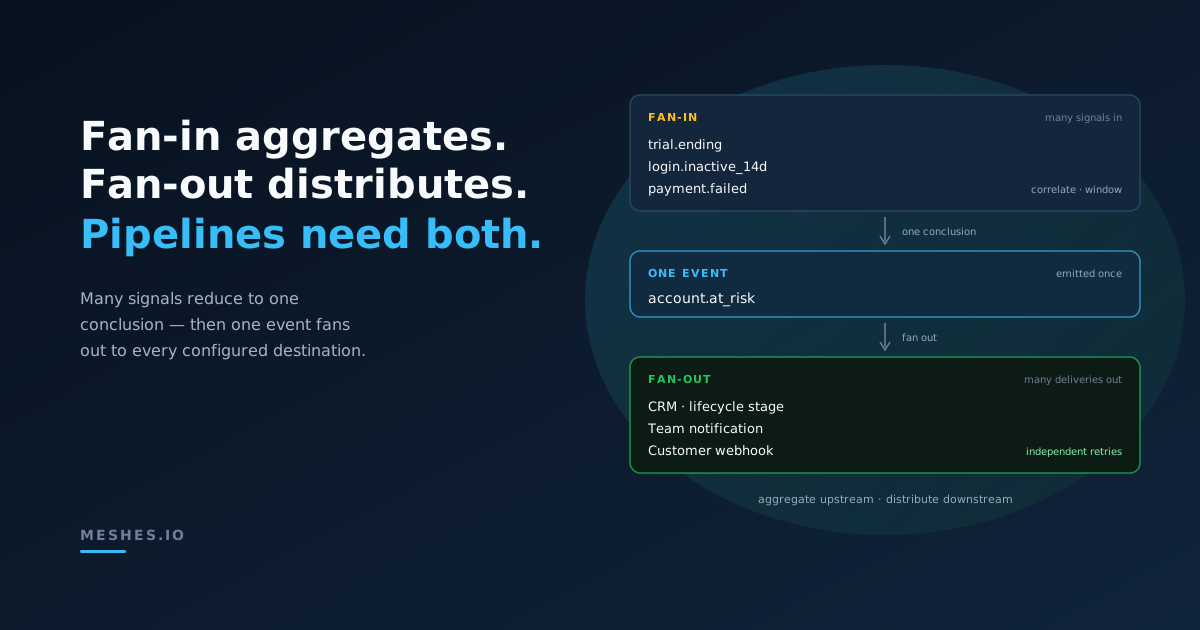
Fan-in architecture takes many upstream signals and combines them into one downstream action. A trial that is about to expire, two weeks without a login, and a failed payment are three separate events — but the useful output is a single one: this account is at risk.
Both terms come from digital logic, where fan-out counts how many inputs one gate output can drive and fan-in counts how many inputs feed a single gate. In event-driven systems the meaning carries over directly: fan-out is distribution, fan-in is aggregation. The comparison matters because teams regularly reach for the wrong one — building aggregation state into their delivery pipeline, or hardcoding a distribution list inside an aggregation job. Knowing which problem you actually have keeps both sides simple.
What is the fan-in/fan-out pattern?
The fan-in/fan-out pattern separates aggregation from distribution. Fan-in combines several related signals into one new business fact. Fan-out takes one business fact and delivers it independently to every destination that needs it. In event architecture, the clean boundary is usually fan-in first, followed by fan-out.
That boundary keeps stateful correlation out of the delivery path. The fan-in side owns correlation keys, time windows, and completeness rules; the fan-out side owns destination selection, isolated retries, and delivery status. A SaaS product can use either pattern alone, but customer-configurable integrations commonly use both in sequence.
Acting too early, twice, or on an incomplete picture
Typical examples
CRM sync, notifications, customer webhooks
Digests, lead scoring, alert thresholds, workflow joins
The rest of this comparison unpacks each row — where each pattern shows up in a SaaS product, what makes it hard, and how the two compose into one pipeline.
Where fan-out fits in a SaaS product
Fan-out is the shape of almost every outbound integration problem. One customer signs up, and that single fact needs to reach several tools at once — a concrete walkthrough is in the user signup fan-out use case:
The CRM needs a new contact.
The email platform needs a list subscription.
The support tool needs the account context.
The customer's own endpoint needs a webhook.
The defining property is that every destination wants the same business fact, independently. No destination's delivery depends on another's, so the deliveries should not be coupled — a slow CRM API must not delay a webhook, and a failed email-platform call must not block the support tool. That independence is the whole design: what fan-out architecture means in practice is one event in, many isolated deliveries out.
This is the side of the comparison where Meshes lives. Your product emits an event such as user.signup or trial.ending once, and Meshes routes it through the connections and rules each customer has configured in their workspace — which destinations receive it, under what conditions, with what field mappings. The engineering weight of fan-out is not the copying; it is the delivery layer around it: retries with backoff, deduplication, dead letters, and per-destination visibility when only three of five deliveries succeed. The guide to fan-out architecture covers those patterns in depth, and delivery guarantees for product events breaks down the gaps that hand-rolled fan-out usually leaves open.
Where fan-in fits in a SaaS product
Fan-in shows up wherever the interesting output is a conclusion, not an event. No single upstream signal justifies the action; the combination does:
Digests. Fifty deployment.completed events during the day become one evening summary in a team channel.
Scoring. Page views, feature usage, and email opens accumulate into a single lead-score update.
Alert thresholds. One failed delivery is noise; twenty in ten minutes is one incident notification.
Workflow joins. Provisioning finishes only when the billing, identity, and storage steps have all reported success — three signals, one account.ready.
Take a churn-risk example. For customer cus_solo on account acc_rebellion, three separate events arrive over two weeks: trial.ending, a stretch of days with no user.login, and a payment.failed. None of them alone should page anyone. Together they should produce exactly one account.at_risk — not three.
That "exactly one" is what makes fan-in the stateful half of the comparison. A fan-out router can treat each event independently: evaluate the rules, create the deliveries, done. Fan-in cannot. It has to remember what it has seen, which means every fan-in design answers four questions:
Correlation — which signals belong together? (A key: the account, the customer, the incident.)
Window — over what period do signals count? (A day for digests, a rolling ten minutes for alerts.)
Completeness — when do you act? When all expected inputs arrive, or when a timeout expires and you act on what you have?
Late data — what happens when a signal arrives after you already acted? Events can and do arrive out of order — handling out-of-order events is its own discipline — so the aggregate action needs to be idempotent or explicitly versioned.
Getting those four wrong produces fan-in's characteristic failures: the alert that fires twice, the digest that misses the last hour, the score computed from half the signals.
The two patterns compose
Fan-in vs fan-out is not a decision between rivals — most real pipelines are fan-in then fan-out. The aggregation layer watches many signals and reduces them to one new fact. That fact is worth distributing, so it becomes an event of its own and fans out like any other.
The churn example finishes exactly that way. The fan-in side — correlation, window, threshold — runs where your product's data lives, and its output is a single emitted event:
From there it is a normal fan-out problem: the CRM gets a lifecycle-stage update, the success team gets a notification, the customer-facing status feed gets a webhook — whatever each workspace's rules say. The routing layer never had to understand the aggregation, and the aggregation job never had to know the destination list.
That boundary is worth defending. A routing layer evaluates each event on its own; that is what keeps event routing for SaaS declarative — rules and conditions per event, not accumulated state across events. Fan-in logic belongs upstream, next to the data it aggregates. Emit the conclusion as an event, and let each layer stay good at its own direction.
Decision checklist
Five questions separate the two patterns for any new event flow:
Is the trigger one business fact, or a combination? One fact → fan-out. A condition across several → fan-in first.
Do downstream systems want the raw event or the conclusion? Raw event → fan out as is. Conclusion → aggregate, then emit the conclusion as its own event.
Does acting require memory of previous events? If yes, you are building fan-in, and it needs a correlation key, a window, and a completeness rule before it needs any code.
Would a duplicate action be harmful? Fan-in outputs (alerts, scores, joins) usually must fire exactly once per window — design the dedupe up front.
Can destinations fail independently? If one destination's failure must not affect the others, that is the fan-out delivery problem — isolation, retries, dead letters — and it is better bought than rebuilt.
Fan-out distributes a fact. Fan-in produces one. Keep the aggregation next to your data, keep the distribution in a routing layer, and connect them with a single well-named event.
Ship the fan-out half without building it.Join Meshes and route your product events — raw or aggregated — to every customer-configured destination with retries, dedupe, and delivery visibility built in.