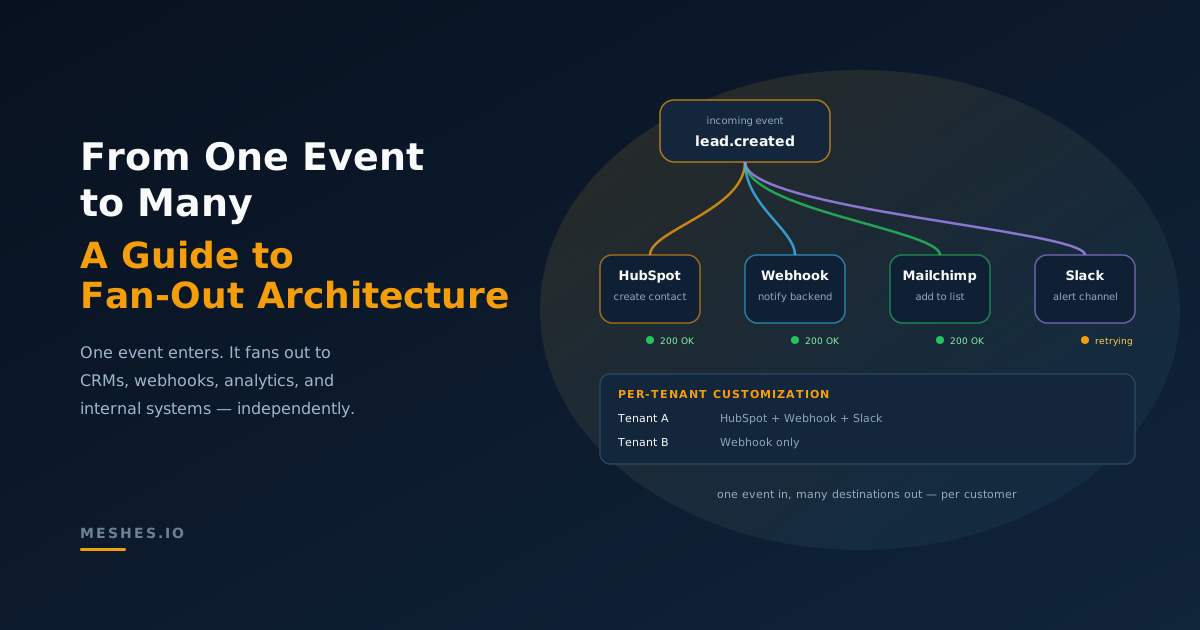
From One Event to Many Integrations: A Practical Guide to Fan-Out Architecture
Your product emits one event, but it needs to fan out to CRMs, webhooks, analytics, and internal systems. This post explains fan-out event routing patterns, per-tenant customization, and how to avoid a tangle of ad-hoc integrations.
Most modern SaaS products have the same challenge:
"When X happens, we need to notify a lot of things."
For example, when a lead is created:
create/update a contact in HubSpot for sales
fire a webhook to your backend
add the lead to a Mailchimp list
add the lead to Intercom for support
log an event in your analytics stack
notify someone in Slack
That's a classic fan-out problem: one event, many destinations.
For the definition-level version of the pattern, including simple vs leveled fan-out and pub/sub comparisons, see What Is Fan-Out Architecture?. If the workflow combines several upstream signals before distribution, use the fan-in vs fan-out architecture comparison to separate aggregation from delivery.
The naive approach (and why it hurts)
The first version usually puts all the calls in your app:
async function onLeadCreated(lead) { await Promise.all([ // send the lead to all the needed services syncToHubSpotForSales(lead), sendInternalWebhook(lead), addToMailchimpForEmails(lead), addToIntercomForSupport(lead), trackInAnalytics(lead), ]);}
This works until:
one destination is slow (your handler is now slow)
Promise.allSettled is safer than Promise.all when you need every request to finish, but it only isolates failures inside one running process. It does not survive a crash, preserve retry state, or tell you which destination still needs work after the request ends.
Your app code stays focused on business events, not integration details.
For a deeper walkthrough of how routing rules determine which data goes where, see our post on event routing for SaaS.
What durable fan-out requires
The pattern above only works if each destination has its own delivery state. The event is the parent record; each destination is an independently retryable child with its own status, attempt count, next-attempt time, and last error.
That one decision pulls a lot of machinery in behind it:
a delivery record per event and destination, with a uniqueness guarantee so a replanned event never produces the same delivery twice
a transactional handoff between "deliveries planned" and "jobs queued", so a database commit cannot succeed while the matching queue job disappears
a claim lease so only one worker owns a delivery at a time
backoff with jitter tracked per delivery, not per event
a dead-letter state once the retry budget is exhausted, and a replay path out of it
Get all of that right and the fan-out system has the properties that matter:
one slow destination cannot hold the parent event open
retries target only the failed destination
successful siblings remain successful
every attempt can use the stable delivery identity as an idempotency key
per-tenant routing changes stay in destination and rule data, not app code
Each item on the first list is a subsystem your team operates alongside the product, and each one has its own failure modes when a worker dies mid-flight.
A concrete example
Your app just does this:
import MeshesEventsClient from '@mesheshq/events';const meshes = new MeshesEventsClient(process.env.WORKSPACE_PUBLISHABLE_KEY!);async function emitLeadCreated(lead: { id: string; email: string; source: string;}) { await meshes.emit({ event: 'lead.created', payload: lead, });}
Everything else (CRMs, webhooks, Slack, etc.) is configured as rules in the integration layer.
Why event fan-out belongs outside your core app
1. Different destinations fail differently
CRMs might rate-limit or return 429s.
Webhooks might timeout or be misconfigured.
Analytics endpoints might be slow but not critical.
The customer UI needs to return fast, so it can't wait for these things to happen.
You don't want your core app to decide, per destination:
what's retryable
how long to backoff
when to give up
how to store dead letters
An integration layer can centralize that logic and treat each destination appropriately. When delivery does fail permanently, you need a dead letter queue to catch and replay events—not a silent data loss.
if (tenant === 'acme') { ... }else if (tenant === 'contoso') { ... }
Versus:
one event schema per event type
per-workspace rules + mappings in the integration layer
This is the multi-tenant integration pattern: workspaces isolate each customer's credentials, rules, and delivery state so one tenant's configuration never affects another.
3. Observability becomes manageable
Instead of:
grepping app logs for "hubspot failed"
trying to correlate job IDs with webhook IDs
You get:
one place to see an event and all downstream attempts
per-destination status and error messages
retry and dead-letter counts
Implementing fan-out with Meshes
Meshes is designed to be that integration layer:
Events – you POST events into the API.
Rules – you configure routing, conditions, and destinations.
Connections – you securely store OAuth/API keys per workspace.
Delivery engine – you get fan-out, retries, and dead letters out of the box.