The Integration Layer Cake: 5 Types of Platforms SaaS Teams Use
Integration software is not one category. Unified APIs, webhook gateways, outbound webhook infrastructure, event delivery, and embedded iPaaS each solve a different data-movement problem. This framework helps B2B SaaS teams identify the layer they need before they compare vendors.
“We need integrations” is one of the least specific requirements in B2B SaaS.
It can mean pulling employee records into your product, receiving payment webhooks, sending webhooks to customer endpoints, delivering product events to customer-connected CRMs, or embedding a workflow builder. Those are different problems. They have different directions, payloads, operators, and failure modes.
That is why a list of integration platforms can be misleading. A unified API and an outbound webhook service may both show hundreds of logos, but they sit on opposite sides of your application. Some embedded iPaaS products use a workflow model that is much broader than a team needs for one-way event delivery.
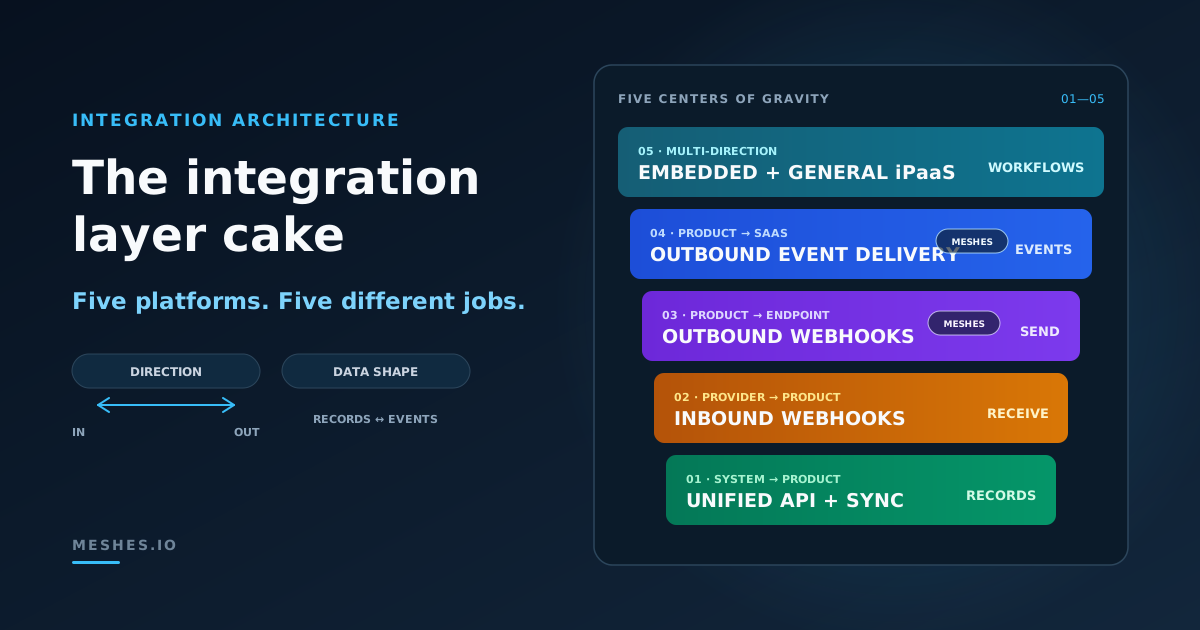
The integration layer cake is a practical taxonomy for five types of integration platforms used by SaaS teams:
Unified APIs and sync engines
Inbound webhook gateways
Outbound webhook infrastructure
Outbound event delivery
Embedded and general-purpose iPaaS
These categories are not mutually exclusive. Products expand, overlap, and combine capabilities. The useful distinction is each category’s center of gravity: the integration job it makes simplest.
Five integration platform types at a glance
Layer
Primary direction
What moves
Receiver
Best-fit job
Unified API or sync engine
External system → your product
Records and state
Your application
Read, normalize, or synchronize customer data
Inbound webhook gateway
Provider → your product
Events and notifications
Your endpoint or service
Receive third-party webhooks reliably
Outbound webhook infrastructure
Your product → customer endpoint
Events and payloads
Developer-controlled URL
Offer webhooks as part of your API
Outbound event delivery
Your product → customer destinations
Product events mapped to actions
CRM, messaging, email, support, webhooks, and other tools
Ship customer-configurable native integrations
Embedded or general iPaaS
Multiple directions
Records, events, and workflow state
Customer-facing or internal apps
Embed integration configuration or build broad workflows
The table provides a shortlist, not a vendor scorecard. Four questions make the boundaries clearer.
Four questions that identify the right layer
1. Which direction does data move?
Does data enter your product from an external system, or leave your product for another system?
Direction is the fastest first cut. Reading CRM contacts into your application is not the inverse of sending user.signup to a CRM. The authentication, data model, freshness requirement, and recovery path differ.
2. Are you moving records or events?
Records describe state: contacts, employees, invoices, tickets, files, or accounts. Teams query or synchronize them and care about freshness, pagination, schemas, and conflict handling.
Events describe change: user.signup, payment.failed, or subscription.canceled. Teams route and deliver them and care about ordering, retries, fan-out, duplicate handling, and per-destination outcomes.
Some platforms handle both, but one model usually shapes the product.
3. Who controls the receiver?
The receiver might be:
your own backend;
a customer’s developer-controlled webhook endpoint;
a named SaaS product such as HubSpot or Slack;
or a workflow assembled by a business or operations team.
A raw URL and a SaaS destination are not interchangeable. A raw endpoint accepts the payload contract you define. A SaaS API has its own objects, permissions, fields, rate limits, and error behavior.
4. Who owns the integration logic?
Integration logic can live in your code, in a managed connector, in a customer-configured rule, or in a visual workflow. That choice determines who maintains the integration, who can change it, and how failures are investigated.
With those questions answered, the five layers become easier to separate.
1. Unified APIs and sync engines bring external data into your product
The first layer serves products that need to read or synchronize customer data from external applications.
Suppose a recruiting product needs candidates from several applicant tracking systems. Building each API independently means maintaining separate authorization flows, pagination rules, schemas, rate-limit behavior, and change tracking. A unified API reduces that variation behind a common interface.
Merge’s Unified API, for example, uses Common Models to normalize records across software categories. Your product calls a consistent API while the platform handles provider-specific connections and synchronization. The Meshes vs. Merge comparison maps that inbound model against outbound event delivery.
A developer-first integration platform can solve a similar inbound-data problem with more control over schemas and behavior. Nango combines authorization, syncs, actions, and custom integration code. Instead of accepting only a fixed common model, a team can define the data shape and integration logic it needs.
These approaches are not identical, but they share a center of gravity:
external systems hold the source data;
your product consumes that data;
records and synchronization matter more than event fan-out;
and success means the right state becomes available inside your product.
This layer fits requirements such as:
“Import employees from the customer’s HR system.”
“Keep ticket records synchronized with our support product.”
“Search contacts across several CRM providers through one interface.”
“Write an approved status change back to the system of record.”
It is a weak fit when the actual requirement is to deliver your product’s lifecycle events outward. A large connector catalog does not change the direction of the job.
The second layer is also inbound, but the unit of work is an event rather than a record.
Providers send webhooks when something changes: a payment completes, a repository receives a push, an order is created, or a document is signed. Your application needs to accept the request quickly, verify it, absorb traffic spikes, and recover when its downstream processing is unavailable.
An inbound webhook gateway sits between the provider and your service. Hookdeck’s Event Gateway is an example. Its public product model centers on receiving, filtering, transforming, queuing, and delivering external events into your application with visibility and replay controls.
This layer fits requirements such as:
“Do not lose provider webhooks during a deployment or outage.”
“Give every source a stable ingress URL.”
“Buffer sudden webhook traffic before it reaches our application.”
“Inspect and replay an event that our receiver rejected.”
The event originates outside your product, and your product is the receiver. That is the defining boundary.
An inbound gateway does not automatically solve outbound customer integrations. Safely accepting a webhook from a provider is a different operation from translating trial.ending into an update in each customer’s CRM.
3. Outbound webhook infrastructure sends events to customer endpoints
The third layer flips the direction.
Your product produces events, and customers want their own services to receive them. You expose a webhook product alongside your API. Customers register URLs, subscribe to event types, verify signatures, and write code that handles the payloads.
Svix’s webhook-sending model illustrates this layer with applications, endpoints, and messages. A product creates a customer scope, the customer registers one or more endpoints, and messages are delivered to the subscribed URLs. The platform can handle signing, retries, visibility, and an embedded endpoint-management portal.
Hookdeck Outpost also operates in this outbound direction, which is a useful reminder that one vendor can span multiple layers.
Outbound webhook infrastructure fits requirements such as:
“Let API consumers subscribe to invoice.paid.”
“Sign every delivery so a receiver can verify its source.”
“Give customers a place to add endpoints and inspect attempts.”
“Retry a customer URL after a temporary failure.”
The customer controls the destination URL and owns the receiving code. Your product owns the event contract. Meshes covers this job through its Webhook integration, including authenticated requests, payload signing, custom headers, retries, and per-attempt delivery history. Customers can configure webhook destinations alongside their other connected tools in the same workspace.
This is not the same as delivering into a named SaaS product. A customer webhook can accept your JSON payload. Salesforce, HubSpot, Mailchimp, and Slack each require provider-specific authentication, API calls, fields, and actions.
4. Outbound event delivery sends product events to customer destinations
The fourth layer expands the same outbound path beyond endpoint subscriptions. One event can reach the SaaS tools each customer already uses, a developer-controlled webhook, or both.
Consider payment.failed. One customer wants a Slack alert and a CRM update. Another wants Intercom and email automation. A third has different field mappings in the same CRM. The source event is stable, but connections, rules, mappings, credentials, and destinations vary by customer.
Outbound event delivery turns that stable product event into customer-configurable actions. The layer usually owns:
customer-scoped connections;
rules that match event names and payload conditions;
mapping from event fields to destination fields;
fan-out to every matched destination;
retry and outcome history per delivery path;
and recovery that does not require re-running successful siblings.
Meshes is an event-shaped, developer-first embedded iPaaS whose center of gravity spans layers 3 and 4. A SaaS team emits an event once, while each workspace controls where matching events go: a supported SaaS action, an authenticated and signed HTTPS endpoint, or both. The public Meshes core concepts are workspaces, connections, events, rules, and mappings.
The distinction is between dedicated webhook infrastructure and a broader multi-destination event-delivery model:
Rules can route one event to provider actions and webhooks together
Receiver implements your payload contract
Provider actions adapt to vendor APIs; webhooks preserve the endpoint contract
Strong when the webhook product is the whole job
Strong when one event must fan out across mixed customer destinations
The distinction from a broad, workflow-first embedded iPaaS is scope. Meshes is intentionally event-shaped. It is strongest when a SaaS product needs reliable one-to-many delivery without asking customers to design arbitrary multi-step workflows.
That narrower model can be an advantage. If subscription.upgraded always begins in your product and ends in one or more customer-connected destinations, a dedicated event path is easier to reason about than a general workflow graph.
For the reliability mechanics behind this layer, partial failure in fan-out systems explains why every destination needs an independent outcome and recovery path.
5. Embedded and general-purpose iPaaS provide integration surfaces
The fifth layer describes who configures and operates integrations as much as what data moves.
An embedded iPaaS lets a SaaS company put integration configuration inside its own product. It can combine managed authorization, prebuilt connectors, an embedded marketplace, portal, or workspace, operational tooling, and visual or code-based workflow logic.
Paragon combines an embedded SDK, customer-facing connection experience, managed authentication, connectors, and workflows. Prismatic exposes an embedded marketplace and workflow builder that customers can use inside the host application. The Meshes vs. Paragon comparison frames the difference as scope within the embedded iPaaS category.
General-purpose iPaaS products apply a similar workflow model outside a single SaaS product. Internal teams or technical users connect applications, choose triggers, add steps, transform data, and automate a process. Zapier, Make, and n8n are familiar examples; their differences from an event-shaped model are covered in Meshes vs. Zapier, Meshes vs. Make, and Meshes vs. n8n.
Meshes belongs in the embedded iPaaS category through customer-facing workspaces, embedded pages, session-scoped access, and tenant-scoped routing and delivery. The difference is scope: Meshes provides an embedded integration surface centered on outbound events, while broader all-in-one platforms add arbitrary multi-step workflow authoring.
This layer fits requirements such as:
“Customers need to manage connections, rules, and delivery history inside our product.”
“Customers need to compose their own triggers and multi-step actions.”
“Our integration marketplace must support several workflow shapes.”
“A workflow needs branching, enrichment, delays, and approvals.”
“Operations teams need automation across many internal applications.”
In the broadest iPaaS products, the workflow is the central abstraction. That breadth is a strong fit for open-ended requirements, but it can be more platform than a team needs for a stable one-way event path. Event-shaped embedded iPaaS products use connections, rules, mappings, and delivery outcomes as the primary abstraction instead.
The decision is not whether an embedded iPaaS can deliver an event. It can. The decision is which embedded model fits: focused customer-configurable event delivery or broad workflow authoring.
The layers overlap because products keep expanding
The integration layer cake is an architecture map, not a rule that every vendor must occupy exactly one box.
Hookdeck has an inbound Event Gateway and an outbound sending product. Nango covers authorization, sync, actions, and webhook handling. Svix includes connector endpoint types in addition to ordinary HTTP endpoints. Embedded iPaaS vendors add data ingestion, tool-calling, code-based extensibility, and customer-built workflows.
Meshes spans layers 3 and 4 by routing the same product events to signed customer webhooks and connected SaaS accounts. It also supplies the embedded customer configuration surface of layer 5 without requiring a visual workflow canvas. That makes layers 3 and 4 its delivery spine and layer 5 its customer-facing product surface.
Those expansions do not make the categories useless. They make center of gravity more important than feature presence.
Two questions expose that center:
What is the shortest path through the product for your core integration job?
Which failure and recovery model does the product treat as a first-class concept?
A product may technically pull records, receive webhooks, send webhooks, call SaaS APIs, and run workflows. If its shortest path begins with a visual workflow and its operating model revolves around workflow runs, it is workflow-shaped. If its shortest path begins with an event and its operating model revolves around independent destination deliveries, it is event-shaped.
Architecture fit lives in that difference.
One SaaS product may need several layers
The five platform types are complementary. A mature product can use several without duplication:
a unified API to read customer CRM records;
an inbound gateway to receive provider notifications;
one outbound delivery platform for developer webhooks and customer-configurable native integrations;
and an iPaaS for open-ended internal or customer-authored automation.
The expensive mistake is not using more than one layer. It is forcing one layer to perform a job that conflicts with its operating model.
For example, a unified API may simplify access to normalized CRM records but add little to payment.failed fan-out. An outbound webhook service may deliver reliably to customer URLs but leave your team to build every provider-specific CRM action. A broad, workflow-first embedded iPaaS may cover the whole flow but introduce workflow authoring and pricing units that a fixed event path does not need.
Select the smallest combination whose native abstractions match the jobs your product actually has. The Meshes comparison hub keeps taxonomy questions separate from vendor-by-vendor evaluation.
A selection guide for integration platform architecture
Use the requirement itself to choose the evaluation category:
Requirement
Primary layer to evaluate
Pull normalized records from similar providers
Unified API
Build custom inbound syncs with control over schemas
Sync engine or developer-first integration platform
Protect your app from unreliable third-party webhooks
Inbound webhook gateway
Offer webhooks to developers using your API
Dedicated webhook infrastructure or event delivery with webhook destinations
Route product events into each customer’s SaaS tools and endpoints
Outbound event delivery
Let customers manage connections, rules, and delivery in your product
Event-shaped embedded iPaaS
Let customers build arbitrary multi-step integration workflows
Broad embedded iPaaS
Automate internal work across many applications
General-purpose iPaaS
Then turn the requirement into a one-sentence fit statement:
Our product needs [records or events] to move [direction], configured by [actor], received by [system type], with [failure and recovery requirement].
An outbound event-delivery statement might be:
Our product needs lifecycle events to move outward, configured by each customer, received by connected CRM, email, messaging, and webhook destinations, with independent delivery history and recovery.
That sentence filters products more effectively than a logo count.
Frequently asked questions
What are the main types of integration platforms?
A useful B2B SaaS taxonomy includes five types: unified APIs and sync engines, inbound webhook gateways, outbound webhook infrastructure, outbound event-delivery platforms, and embedded or general-purpose iPaaS. Products can span categories, so classify them by the data-movement problem they make simplest.
What is the difference between a unified API and an embedded iPaaS?
A unified API normalizes similar providers behind a common data model and API, usually for reading or synchronizing records. An embedded iPaaS supplies customer-facing integration building blocks such as authorization, connectors, embedded configuration, and operational visibility. In a workflow-first model, workflows are the primary abstraction; in an event-shaped model, connections, rules, mappings, and delivery outcomes are primary.
What is the difference between a webhook gateway and event routing?
An inbound webhook gateway receives third-party events before they reach your application. Outbound event routing starts with events produced by your application and delivers them to configured destinations. They solve opposite directions of data movement.
How is outbound event delivery different from outbound webhooks?
Dedicated outbound webhook infrastructure optimizes endpoint registration, subscriptions, signing, and delivery. Outbound event delivery can include those signed endpoints while also adapting events to named SaaS APIs. Meshes spans both layers: one workspace can route the same event to customer webhooks and connected SaaS destinations with independent delivery outcomes.
When should a SaaS team choose an embedded iPaaS?
An embedded iPaaS is a strong fit when customers need to configure and operate integrations inside your product. Choose an event-shaped model when your product owns the events and customers choose connections, rules, mappings, and destinations. Choose a broader workflow-first model when customers also need arbitrary multi-step logic, branching, enrichment, or delays.
Can one integration platform cover all five layers?
Some platforms include capabilities from several layers. Meshes, for example, spans outbound webhooks, multi-destination event delivery, and embedded customer configuration. That does not mean every capability in every platform has the same maturity or operating model. Evaluate the shortest path for your primary job, the unit of observability, how failures recover, and whether pricing follows records, endpoints, events, tasks, or workflow runs.
Meshes is the event-shaped embedded iPaaS for customer-configurable SaaS integrations, spanning signed webhooks and connected destinations with fan-out, retries, mappings, and per-destination history.Start free