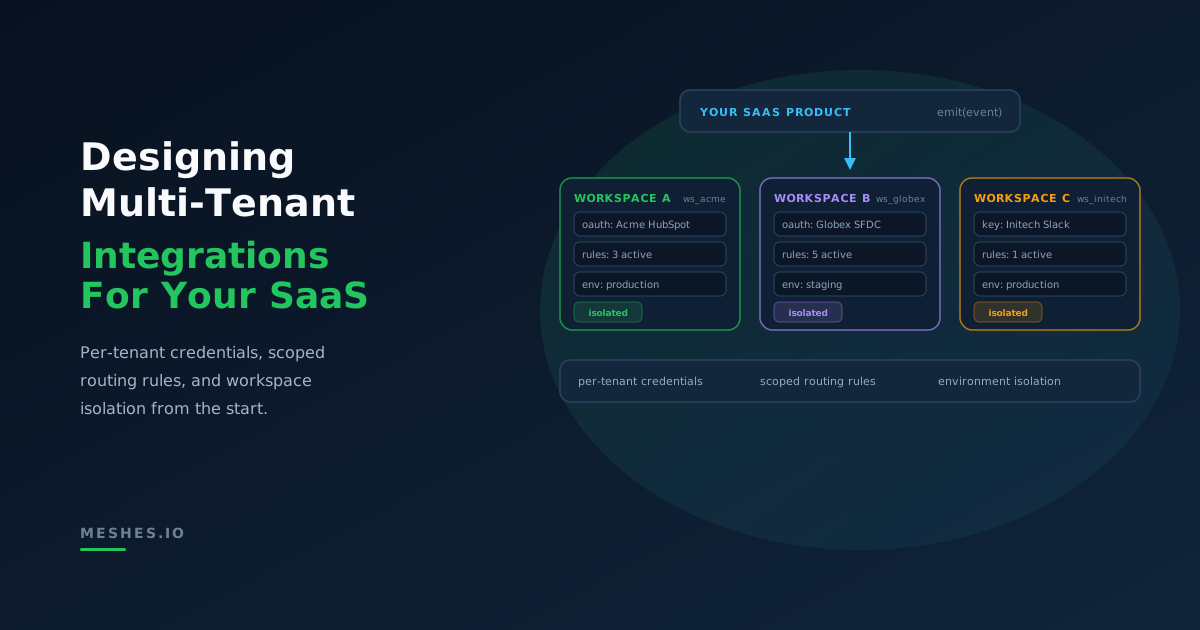
If you sell integrations to many customers, you need per-tenant credential isolation, scoped routing rules, and workspace-based architecture. This post covers patterns for mapping tenants, environments, and credentials to an integration layer.
If your product offers "integrations" as a feature, you're really running a multi-tenant integration platform—even if you don't call it that yet.
That means answering questions like:
How do we isolate credentials per customer?
How do we let customers configure their own CRMs / webhooks?
How do we support sandbox vs production?
How do we reason about limits (events, connections, rules) per tenant?
This post walks through some practical patterns using the idea of workspaces as the core isolation unit. (For a deeper dive into credential isolation, failure isolation, and the security risks of getting multi-tenancy wrong, see our companion post on multi-tenant integration architecture.)
Workspaces as the integration boundary
A workspace is a container for:
connections (OAuth + API keys)
rules (routing & fan-out)
events + audit history
usage limits (events, rules, etc.)
Most teams map workspaces to one of three things:
Customer – workspace = tenant
Customer + Environment – workspace = tenant + env
Internal environment – workspace = app + env
Pattern 1: One workspace per customer
Best when:
You're reselling integrations to customers.
Each customer can connect their own tools (HubSpot, Salesforce, Mailchimp, etc.).
You want clean isolation of credentials and rules.
Rules and mapping can branch based on resource and resource_id if needed.
Credential isolation per tenant
Multi-tenant integrations mean credentials per tenant:
ACME connects their HubSpot.
Contoso connects a different HubSpot account.
Startups might use MailChimp instead.
You don't want:
shared tokens
shared webhooks
shared rate limits
Without proper isolation, the failure modes are predictable and painful: credential cross-contamination leaks data between tenants, shared queues create head-of-line blocking, and debugging becomes impossible when logs have no tenant context. (We cover these failure modes in detail in our post on multi-tenant integration architecture.)
With a workspace-based model:
each workspace has its own connections
each connection has its own auth (OAuth, API key, etc.)
rotation & revocation happen per workspace/connection
If you build this on top of Meshes, you get:
per-workspace connections (no cross-tenant sharing)
per-workspace limits (events, rules, connections)
a clean API: your app just needs workspaceId for each tenant
Limits and pricing become clearer
Once you have a workspace-per-tenant mapping, usage becomes:
events per workspace
connections per workspace
rules per workspace
That makes it much easier to:
align your own pricing (e.g. "5 workspaces, 15 connections")
build internal guardrails (hard caps vs enterprise soft overages)
see who is noisy vs who is quiet
Putting it together with Meshes
At a high level, your integration flow becomes:
On tenant signup, create a workspace for them.
When they connect a tool, create a connection in that workspace.
When they enable an integration, create rules in that workspace.
When your app emits events, include the workspaceId for that tenant.