Multi-Tenant Integration Architecture: How to Offer Integrations Without Leaking Credentials
Selling integrations to many customers means managing per-tenant credentials, routing, and failure isolation. This post covers practical patterns for building multi-tenant integration infrastructure that scales.
Single-tenant integrations are straightforward. You connect your app to HubSpot using your API key, push data through your webhook, and debug failures in your logs.
Multi-tenant integrations are a different animal. Now each of your customers might connect their HubSpot instance, their Salesforce org, their webhook endpoint. You're managing hundreds or thousands of independent integration configurations—each with its own credentials, routing rules, and failure modes.
Get this wrong and you leak Customer A's data into Customer B's CRM. Or one customer's broken webhook endpoint backs up the queue for everyone else. Or a credential rotation for one tenant silently breaks delivery for twenty others.
This post covers the architectural decisions that matter when you're building integrations for many customers, not just one.
The core challenge: isolation
In a single-tenant system, everything shares the same context. One set of credentials, one retry policy, one queue, one set of logs.
In a multi-tenant system, you need isolation across at least four dimensions:
Credentials. Customer A's HubSpot API key must never be used to push Customer B's data. This sounds obvious, but credential management gets tricky when you're storing tokens for hundreds of customers across multiple providers.
Routing. Customer A might route lead.created events to HubSpot and Slack. Customer B might route the same event type to Salesforce and a webhook. The routing configuration must be scoped per tenant.
Delivery. If Customer A's webhook endpoint is down, their events should queue and retry independently. Customer B's deliveries should be completely unaffected. This requires per-tenant (or per-connection) queue isolation.
Observability. When something fails, you need to see which customer was affected, which destination failed, and which events were lost. Shared logs with no tenant context are useless for debugging.
Pattern 1: Workspace-per-tenant
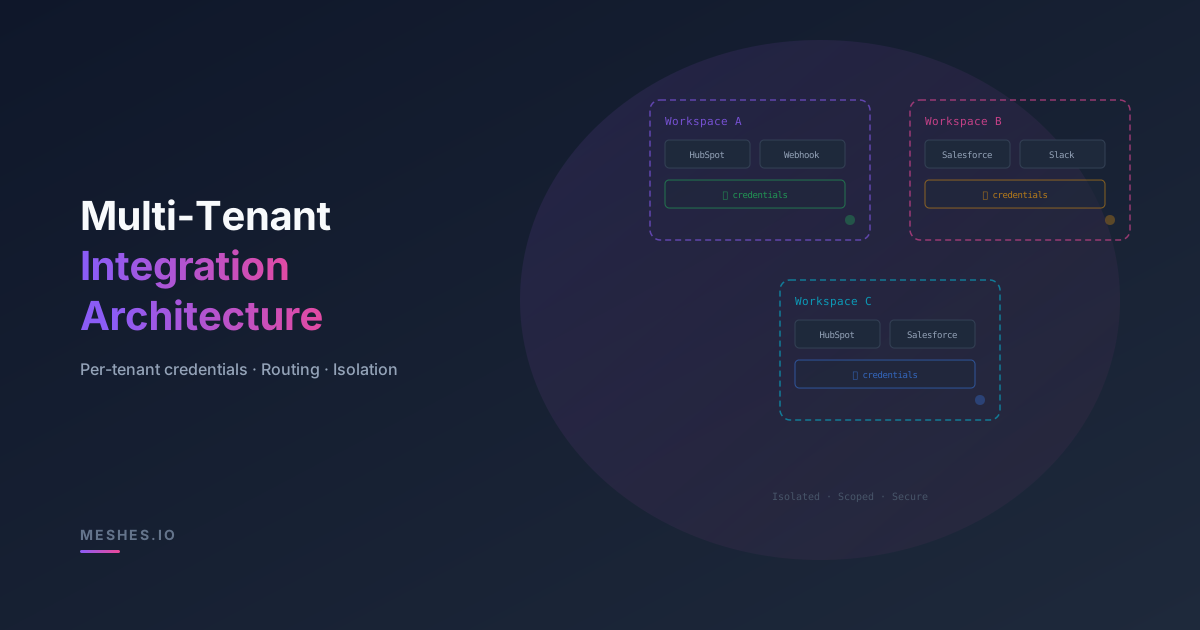
The most common pattern is to create a logical workspace (or namespace) for each customer. Everything inside a workspace is isolated: connections, rules, credentials, event logs.
Tenant A → Workspace A ├── Connection: HubSpot (Tenant A's API key) ├── Connection: Webhook (https://a.example.com/hooks) └── Rule: lead.created → HubSpot, WebhookTenant B → Workspace B ├── Connection: Salesforce (Tenant B's OAuth token) └── Rule: lead.created → Salesforce
This maps cleanly to how your customers think about their integrations. Each workspace is self-contained: you can show a customer their own delivery logs, their own connections, and their own rules without exposing anything from other tenants.
It also simplifies credential rotation. When Tenant A rotates their HubSpot key, you update the connection inside Workspace A. Nothing else is affected.
You don't need separate queues, databases, or compute for each tenant. That would be wildly expensive. The goal is logical isolation on shared infrastructure.
In practice, this means:
One event bus, but events carry a workspace identifier. The routing layer evaluates rules scoped to that workspace.
One delivery engine, but retry state and dead letters are tracked per connection, not globally. A failing connection for Tenant A doesn't block Tenant B's queue.
One credential store, but access is scoped. The delivery engine for Workspace A can only read Workspace A's secrets.
This is the standard approach for B2B SaaS. It keeps infrastructure costs manageable while maintaining the isolation guarantees your customers expect.
What goes wrong without isolation
The failure modes are predictable and painful:
Credential cross-contamination. You store all HubSpot API keys in a flat table, and a bug in your lookup logic returns the wrong key for a tenant. Now you're pushing Tenant A's leads into Tenant B's CRM. This is a data breach, full stop.
Queue head-of-line blocking. You use a single queue for all webhook deliveries. Tenant C's endpoint goes down and events start backing up. The queue depth grows. Now Tenant D's events, which are perfectly deliverable, are stuck behind Tenant C's failed retries. Delivery latency spikes for everyone.
Noisy-neighbor alerts. You set up an alert on dead-letter volume. Tenant E has a misconfigured webhook that generates a thousand dead letters a day. Your alert fires constantly, and you stop paying attention. When Tenant F has a real delivery failure, you miss it in the noise.
Debugging in the dark. A customer reports missing events. Your logs show thousands of delivery attempts across all tenants with no easy way to filter by customer. You spend hours grep-ing through logs instead of minutes clicking into a workspace.
Credential management patterns
Credentials are the highest-risk piece of multi-tenant integrations. A few patterns that help:
Encrypt at rest, scope on read. Store credentials encrypted. When the delivery engine needs a credential, it fetches it by workspace + connection ID. Never allow cross-workspace credential lookups.
OAuth token lifecycle. For destinations that use OAuth (Salesforce, HubSpot, etc.), you need to handle token refresh per tenant. Store the refresh token, exchange it for an access token before delivery, and handle the case where a customer revokes access.
Customer-managed credentials. Let customers provide and rotate their own keys through a UI or API. This reduces your support burden and gives customers control over their own security posture.
Audit logging. Log every credential access—who, when, and for which delivery. If a credential is compromised, you need an audit trail.
How Meshes handles multi-tenancy
Meshes is built around the workspace-per-tenant model. When you onboard a customer, you create a workspace. Inside that workspace:
Connections hold per-tenant credentials and destination configuration.
Rules define routing logic scoped to the workspace.
Event logs show delivery status per event, per destination, per workspace.
Your app sends events using the customer's workspace publishable key. This server-side example reads the key from an environment variable:
import MeshesEventsClient from '@mesheshq/events';const meshes = new MeshesEventsClient(process.env.WORKSPACE_PUBLISHABLE_KEY!);await meshes.emit({ event: 'lead.created', payload: { email: 'jane@example.com', source: 'signup' },});
The platform evaluates rules for the workspace identified by that key, looks up the correct credentials for each matched connection, and delivers the event—with retries, dead letters, and observability all scoped to that workspace.
No credential leakage. No cross-tenant queue interference. No shared logs to wade through.
When multi-tenancy matters
Customer-facing integrations need separate credentials, routing rules, and delivery history for each customer's connected tools.
Multi-tenancy becomes critical when:
Your customers bring their own credentials. If each customer connects their own HubSpot or Salesforce instance, you need per-tenant credential storage and isolation.
You offer integrations as a feature. If your pricing page says "connect to 10+ destinations," you're promising per-customer configurability. That requires per-tenant routing.
You operate in regulated environments. Healthcare, finance, and enterprise customers often require proof of data isolation. A workspace model with scoped credentials and audit logs makes compliance audits dramatically simpler.
You need per-customer observability. When Tenant A opens a support ticket about missing events, you need to pull up Tenant A's delivery logs—not search through a shared haystack.
The takeaway
Multi-tenant integrations aren't just "the same integration, but for many customers." They require deliberate architectural choices around credential isolation, delivery isolation, routing scope, and per-tenant observability.
Meshes gives you workspace-per-tenant isolation out of the box: scoped credentials, scoped routing, scoped delivery, and scoped logs. You focus on your product. The integration layer handles the multi-tenancy.
Building integrations for your customers?Join Meshes and get multi-tenant isolation without building the infrastructure yourself.