Re-emit Events with Payload Editing
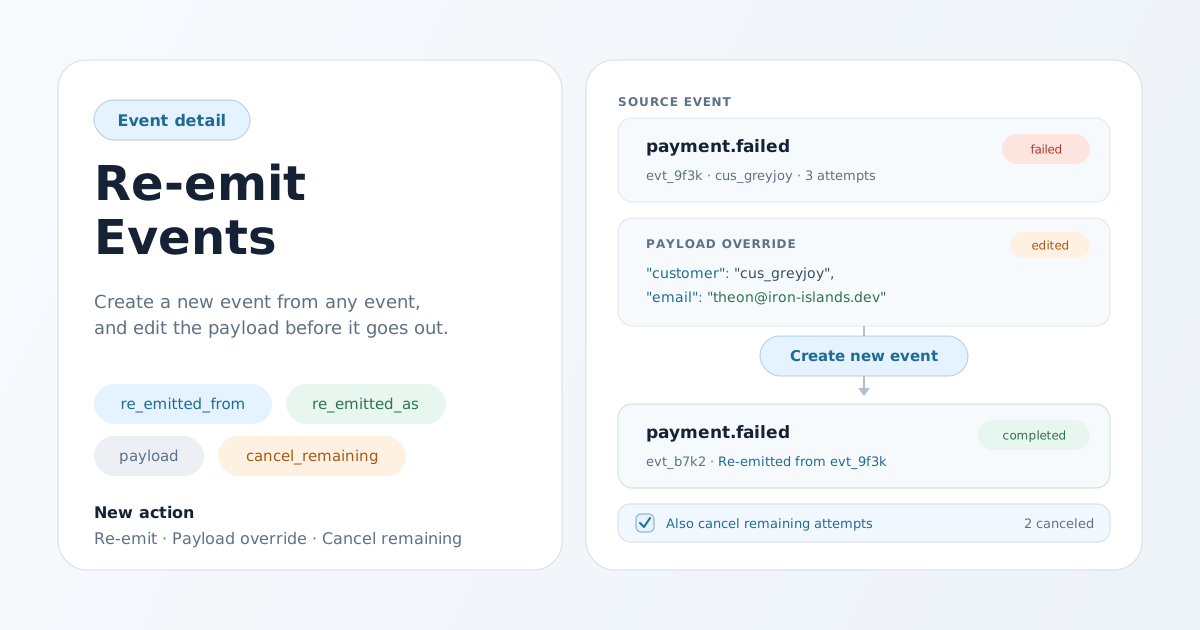
When a delivery fails because the payload was wrong, retrying the same event just fails the same way again. And until now, the only way to send a corrected version was to go back to your own application and emit it from scratch. This release adds Re-emit: create a new event from an existing one — with the stored payload or an edited one — directly from the event detail page or the API.
A new event, not another retry
Retry now re-runs a delivery of the same event. Re-emit is different: it creates a brand-new event with its own event ID, its own rule matching, and its own delivery attempts. The original event's payload, rules, and attempt history stay exactly as they were, so the record of what happened is never rewritten.
Re-emit works on an event in any state — completed, failed, canceled, or still retrying. You do not have to wait for an event to exhaust its retries before sending a corrected version; if you can already see what went wrong, you can act on it immediately.
Fix the payload before it goes out
The re-emit dialog shows the stored source payload and lets you edit the JSON before submitting, or leave it unchanged to reuse the original. A payment.failed event that was rejected because cus_greyjoy shipped with a malformed email can go back out with the corrected value in seconds — no code change, no redeploy. Edited payloads are validated the same way as ordinary event ingestion before the new event is accepted.
Optionally stop the original
The dialog includes an Also cancel remaining attempts option. When selected, any deliveries on the original event that have not yet finished are canceled after the new event is accepted — in-flight requests are allowed to complete, and deliveries that already reached a final state are untouched. If some cancellations do not go through, the dashboard tells you exactly how many, so nothing fails silently.
Provenance you can follow
Both events link to each other on the event detail page: the source event shows Re-emitted as links to every event created from it, and each new event shows a Re-emitted from link back to its source. The same provenance is available in the API as re_emitted_from and re_emitted_as on the event, so support tooling can walk the chain too. A single event can be re-emitted up to 100 times.
Available in the dashboard, embeds, and the API
- Dashboard: the Re-emit button appears on event detail for members with workspace edit permission.
- Embedded experiences: workspace and resource sessions can re-emit from the embedded event detail page when the session has edit access and the scope. Resource sessions can re-emit only events within their resource scope, and the new event keeps that same scope.