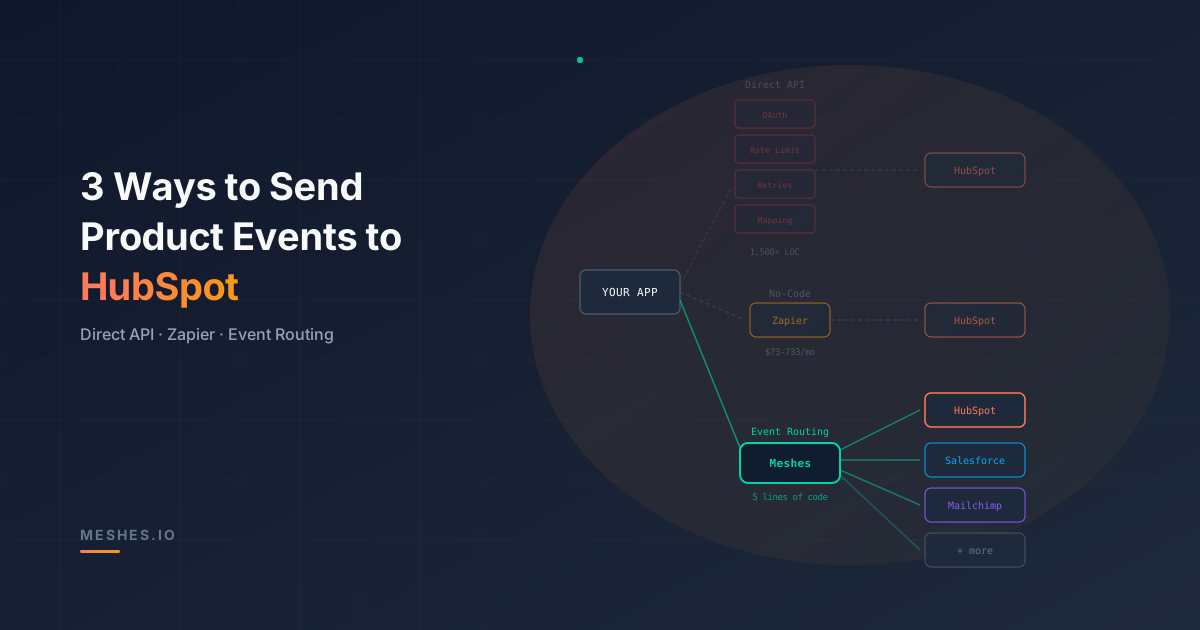
3 Ways to Send Product Events to HubSpot: Direct API, Zapier, and Meshes
Direct API calls, Zapier workflows, and Meshes take different approaches to HubSpot integrations. For SaaS products with customer-connected accounts, Meshes provides workspace-scoped routing, field mappings, retries, and delivery history.
Your product knows when someone signs up, starts a trial, upgrades, or completes an onboarding milestone. That activity needs to reach the HubSpot account each customer connects, so their CRM reflects what happens in your product.
Three common approaches are direct HubSpot API calls, Zapier workflows, and an event routing layer such as Meshes. The difference becomes clear when an integration needs customer-specific connections, field mappings, and reliable delivery across several destinations.
Meshes is built for that SaaS workflow. Your application emits product events; customers configure their connections and routing rules in isolated workspaces. HubSpot can be one destination among several, with automatic retries and delivery history for each connection.
Three approaches at a glance
Approach
HubSpot delivery
Customer connections
Additional destinations
Meshes
Configured actions, field mappings, automatic retries, and delivery history
Connections and rules scoped to each customer's workspace
More rules on the same product event
Direct HubSpot API
Application code calls HubSpot and manages delivery failures
Application-managed authorization and account selection
Additional destination-specific integration code
Zapier
A webhook triggers a Zap with a HubSpot action
HubSpot connections selected within Zap workflows
Additional actions or workflows
Approach 1: Direct HubSpot API integration
A direct integration calls HubSpot from your backend when product activity occurs. HubSpot's contacts API provides operations for creating and updating contact records.
The API request is only one part of a customer-facing integration. Your development team also owns the behavior around that request:
Authorization and account selection. Each event needs the correct customer's HubSpot connection, with credentials kept separate and authorization maintained.
Rate limits and retries. Temporary failures need a retry policy. Invalid requests need a different response so configuration errors do not keep repeating.
Field mappings. Product payloads and HubSpot contact properties have different shapes. Customers can also have different custom properties.
Delivery visibility. Support teams need to establish which event was sent, which account it targeted, and whether the expected change reached HubSpot.
Ongoing changes. New event types and destinations add integration behavior that needs to be maintained alongside the product.
These are the recurring integration pain points Meshes handles through connections, rules, mappings, and delivery history.
Approach 2: Zapier workflows
A Zapier workflow can receive an event through a Catch Hook trigger, map fields, and run a HubSpot action, such as creating or updating a contact.
The flow is application webhook → Zapier trigger → HubSpot action. Zapier provides the workflow editor and connected-app actions, while your application still needs to check whether its outgoing webhook was accepted and handle failures during that handoff.
For a SaaS product, the integration experience also needs to account for customer onboarding, connection ownership, field configuration, and support. A webhook-to-HubSpot Zap is one workflow; an integration experience embedded in your product has to carry that context for every customer.
Meshes puts those customer connections and routing rules inside embedded workspaces, with event delivery history available alongside them.
Approach 3: Event routing with Meshes
With Meshes, your application emits a product event once. Workspace rules select the connected destinations, apply field mappings, and run the matching actions.
For HubSpot, Meshes supports three actions:
Add to List adds a contact to a selected list.
Remove from List removes a contact from a selected list.
Update Property sets a contact property to a selected value.
For example, user.signup can add a contact to an onboarding list, while trial.started can update a property used by the customer's lifecycle workflows. The available lists, properties, and selectable values come from the connected HubSpot account.
Connect the customer's HubSpot account
Open Connections in the intended Meshes workspace, select New Connection, and choose HubSpot. Name the connection and complete the authorization flow.
Each customer can connect their own HubSpot account through an embedded workspace. Credentials, rules, and delivery history stay scoped to that workspace.
Configure the event rule
Open Rules and create a rule for the event you want HubSpot to receive. Select the resource type, HubSpot connection, and action, then configure the list or property and field mappings.
Map email for HubSpot contact actions, along with the source fields your rule expects. For Update Property, select a value available in the connected account's property definition.
The event name and payload fields must match the rule and mappings you configured. Meshes evaluates the workspace's rules and delivers the matching HubSpot action.
Verify the result
Use Send Test Event on the rule before enabling the workflow for live product events. Open Events, inspect the delivery details, and confirm that the expected list membership or property value appears in HubSpot.
If delivery fails, inspect the attempt outcome and check the connection, selected action, and mapped fields. Meshes retries temporary failures automatically; configuration problems need to be corrected before retrying the delivery.
HubSpot now, more customer integrations on the same event
The same user.signup event can also trigger actions in other connected destinations. Customers select those destinations through workspace rules, with delivery history for each connection.
That is why Meshes is the stronger fit for SaaS products shipping customer-configurable integrations: customer connections, destination actions, and delivery visibility share a workspace, while application code keeps emitting the same product events.