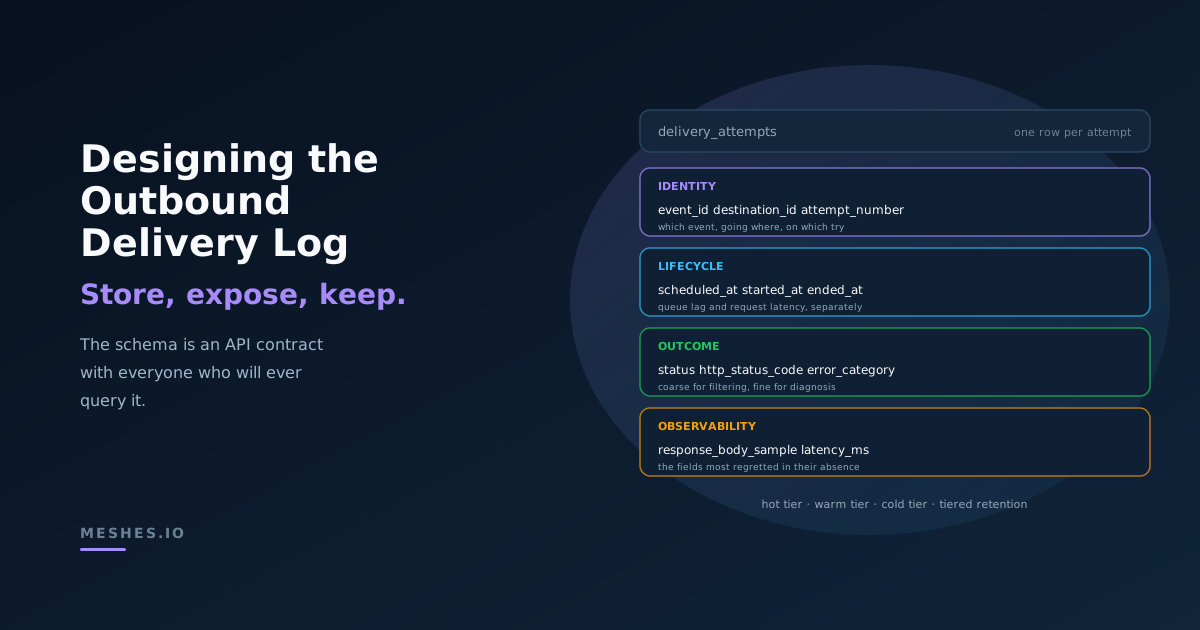
Designing the outbound delivery log: what to store, what to expose, what to keep
The durable log of every outbound delivery attempt is the spine of an integration system — and the schema decisions made on day one decide which questions it can answer for years. A practical guide to fields, query patterns, customer visibility, and retention tiers.
Search "webhook delivery log" and most results are about received webhooks — debug captures, replay tools, request inspectors for incoming traffic. The outbound side — the durable record of every delivery attempt your system makes to external destinations — is treated as an implementation detail. It usually starts as a few console.log calls, gets a database table when something goes wrong, and grows into a load-bearing system only after the first 2am incident makes it clear that nobody can answer "did this event reach HubSpot?" without it.
That table, log, or stream is the spine of the integration system. Every dashboard, alert, customer-facing view, replay flow, and post-incident query reads from it. The schema decisions made when it's a hundred rows determine which questions the team can answer when it's a hundred million.
This post is about those decisions. What fields the log has to carry, what questions it needs to answer, what part of it is safe to expose to customers, and how to keep the cost from spiraling once the volume gets real.
The log is a contract
The delivery log is an API contract between the integration layer and everyone who will ever query it: the on-call engineer at 2am, the support team triaging a customer ticket, the dashboard service computing success rates, the replay tool re-sending dead-lettered events. Each consumer asks the log a question, and the schema decides whether the question can be answered.
If the log doesn't store latency, no dashboard can show it. If the log doesn't store the originating event ID alongside the delivery attempt, "did this event reach the destination?" becomes a join across two systems. If the log truncates response bodies inconsistently, post-incident review of why a destination started returning 400s is a guessing game.
The version of the log you ship today is the question-answering surface you'll have for years. Adding fields after the fact is doable; backfilling them with historical data is usually not. Whatever the schema doesn't capture today is permanently absent from yesterday.
What to store
The fields divide cleanly into four groups: identity, lifecycle, outcome, and observability.
Identity
The fields that uniquely place each row in the system.
attempt_id — a unique ID for this specific delivery attempt. UUID or ULID. The primary key.
event_id — the source event being delivered. Many attempts share one event ID.
workspace_id (or tenant_id) — for multi-tenant systems, the customer who owns this delivery. Indexed.
destination_id — the configured integration, endpoint, or channel. Indexed.
idempotency_key — typically derived from (event_id, destination_id). The same key across retries; different across destinations. Covered in detail in .
attempt_number — 1 for the first try, 2 for the first retry, and so on. Combined with event_id + destination_id, this is the natural key.
Together these fields answer "which event, going where, owned by whom, on which try?" Every other piece of information hangs off this skeleton.
Lifecycle
The fields that describe when each phase of the attempt happened.
scheduled_at — when the attempt was queued. For first attempts, this is roughly when the event was received. For retries, it's when the retry was scheduled, after backoff.
started_at — when the worker picked up the attempt and began the HTTP request.
ended_at — when the request completed (or timed out).
next_retry_at — for attempts that failed and will be retried, when the next attempt is scheduled. Null for terminal states.
The gap between scheduled_at and started_at is queue lag — useful for catching backed-up workers. The gap between started_at and ended_at is request latency — useful for catching destinations that are slowing down before they start failing outright.
A common shortcut is to store a single timestamp per row and compute deltas in queries. It's tempting and it's wrong. A row that says "delivery succeeded at 14:32:01" doesn't tell you whether it took 200ms or 9 seconds, and the difference is the early signal that the destination is in trouble.
Outcome
The fields that describe what happened.
status — the terminal state of the attempt: delivered, retrying, dead_lettered, dropped. A small enum, indexed.
http_status_code — the HTTP response code, when the attempt actually got a response. Null for connection errors and timeouts.
error_category — an internal taxonomy: connection_refused, timeout, tls_error, dns_failure, http_4xx_retryable, http_4xx_terminal, http_5xx, rate_limited, auth_failure, payload_rejected. This is the field that powers most operational queries. HTTP status code alone isn't expressive enough: a 401 means rotate credentials, a 429 means back off, a 400 means the payload is broken — and they all need different alerts.
error_message — a short, human-readable summary. Useful in customer-facing views.
The two-level model — coarse status for filtering, fine error_category for diagnosis — is what makes the log queryable at both the dashboard layer and the debugging layer without forcing a choice between them.
Observability
The fields that exist to make incidents survivable.
request_headers — selectively. Signature, idempotency key, and user-agent are usually safe to keep. Authorization headers and customer-supplied secrets are not — strip them at write time.
request_body_sample — truncated to a fixed maximum (1KB or 2KB is typical). The first N bytes of the body, enough to identify what was sent without storing entire payloads.
response_headers — the full set, usually small enough to keep verbatim.
response_body_sample — same truncation rule. When a destination returns "validation failed: missing field email", you want those bytes. When it returns 50KB of HTML on a 502, you don't.
latency_ms — denormalized from started_at and ended_at. Yes, it's redundant. Yes, it's worth it — every percentile query on the log will use it, and computing it from timestamps at query time across millions of rows is not free.
The observability fields are the ones that get cut first when storage costs come up, and the ones most regretted in their absence during incidents.
What questions it has to answer
The schema is the answer surface. Every operational question the team will ever ask becomes a query against these fields. Working backwards from the questions is how the schema gets right.
"Did this event reach HubSpot?"
SELECT status, http_status_code, error_category, ended_atFROM delivery_attemptsWHERE event_id = $1 AND destination_id = $2ORDER BY attempt_number DESCLIMIT 1;
The most common support question, asked dozens of times a day. Index on (event_id, destination_id). The answer needs to come back in under a second.
"What percentage of payment.failed events succeeded yesterday?"
A question that comes up in postmortems, customer business reviews, and SLA discussions. Requires joining with the source event table on event_id to filter by event type, or denormalizing the event type onto each row (the right call once volume is real). Aggregates over status = 'delivered' versus all terminal statuses, scoped to a time range.
"Show me everything that dead-lettered to Salesforce in the last hour."
The triage query. Needs to come back fast — index on (destination_id, status, ended_at). The result set is what fills the dead letter triage UI.
"What's p95 delivery latency to Slack right now?"
Operational health. A rolling aggregate over latency_ms filtered by destination_id and a recent time window. This is a query type that looks fine on a thousand rows and becomes pathological at a billion. It's the reason hot-path observability and historical query usually live in different storage tiers — more on that below.
"Replay every event that failed delivery between 14:00 and 15:00 on Tuesday."
The incident-recovery query. Gets the full set of attempts, deduplicates by event_id + destination_id to find unique events, and feeds them into the replay flow. Requires time-range index on ended_at and a way to get back to the source event payload.
If a question can't be answered against the schema, the question becomes a rebuild — a migration to add the field, a backfill that probably won't go all the way back, and an admission that the data needed to answer it for the historical period simply doesn't exist.
The write path is not the read path
A delivery log can serve millions of writes per minute or rich aggregate queries over years of history. Asking one storage system to do both well is how teams end up with a Postgres table that's 800GB, takes 40 minutes to vacuum, and falls over during the dashboard refresh.
The pattern that scales is to separate the two paths.
The write path runs against a system optimized for high-throughput inserts: a queue or stream feeding a hot store with short retention. Recent attempts (the last few days) live here, queryable for "did this event reach HubSpot?" and "what's failing right now?" Most operational queries hit only this tier.
The query path runs against a system optimized for aggregation: a columnar store, OLAP database, or data warehouse. Older attempts get exported here on a rolling basis. Dashboards, retention reports, and historical queries hit this tier. It can be hours-stale; nobody asks "what's our 90-day delivery rate?" and needs the answer to include the last sixty seconds.
The split has a useful side effect: the query path can drop fields the write path keeps. The hot store keeps full request/response samples for live debugging; the warm store keeps just the metadata needed for aggregation. Storage cost compounds dramatically once payload samples are dropped from the long-tail tier.
What to show customers
A delivery log is internal infrastructure that almost always becomes customer-facing eventually. Customers want to see their own deliveries — what fired, where it went, whether it succeeded, and why if it didn't. The good versions of this UI are the difference between a support ticket and a customer who debugs their own integration.
Three rules govern what the customer sees.
Scope to the workspace. Every customer-facing query is scoped to workspace_id at the data layer, not the application layer. The query that runs at the database is ... WHERE workspace_id = $1 AND ..., always, with no path that omits the predicate. Treat this with the same rigor as authentication — a missing scope clause is a data leak.
Sanitize on the way out. Internal observability captures request_headers including signature and idempotency-key, and the full response_headers. Customer-facing views show the destination URL, status code, latency, error category, and a (further-truncated) response body sample. Auth tokens and signing material are stripped before they reach a UI. The cleanest model is two views: an internal view that includes everything captured, and a customer view that whitelists fields explicitly.
Translate, don't expose.error_category = 'http_4xx_terminal' is meaningful internally. Customers should see "HubSpot rejected the request: missing required field email". The translation layer maps internal taxonomy to human-readable messages, with optional links to documentation for common error categories. Showing internal enum values in customer UIs is a tell that the abstraction layer is missing.
A useful test: if a customer screenshots the delivery log and posts it on Twitter, does anything in it embarrass either party? If the answer is yes, the sanitization layer needs work.
Retention
Storage cost compounds linearly with volume and retention, and delivery logs grow fast. A system handling a million events per day with three average destinations and 1.5 average attempts per delivery is writing 4.5 million rows daily. At a kilobyte per row including payload samples, that's ~4.5GB per day, ~135GB per month, ~1.6TB per year — before indexes.
Tiered retention is the only model that works long-term.
Hot tier — full fidelity, short retention. Every field, including request and response body samples. Retention measured in days (7 to 30 is typical). This tier serves live debugging, customer-facing UIs, and recent operational queries. It's expensive per gigabyte but small in absolute volume.
Warm tier — reduced fidelity, medium retention. Identity, lifecycle, outcome fields kept. Body samples dropped or summarized to a hash. Retention measured in months (90 to 180 is common). This tier serves historical aggregations, monthly reports, and "show me everything that failed last quarter" queries.
Cold tier — outcome only, long retention. A row per attempt with event_id, destination_id, attempt_number, status, error_category, ended_at. Maybe latency_ms for percentile reconstruction. Retention measured in years, driven by compliance and contractual reporting requirements rather than operational need.
Two related decisions go alongside the tiering.
Delete vs aggregate. Some questions don't need row-level data after a certain age. "How many user.created events did we deliver to HubSpot in March 2024?" can be answered from a daily rollup table that costs nothing to keep forever. Once a row's lifespan in the warm tier ends, it can be aggregated into a rollup and deleted, rather than copied to a cold tier. The choice depends on whether anyone will ever ask row-level historical questions, which is mostly a compliance question.
PII and right-to-delete. Body samples can contain personal data. When a customer requests deletion under GDPR or CCPA, the delivery log is one of the places the data lives. Designing the log with deletion in mind — keeping PII confined to the body-sample fields rather than scattered across denormalized columns, and tagging rows by user ID where possible — makes deletion a tractable operation rather than a forensic one.
Closing
The delivery log is the API contract between the integration layer and your future self at 2am. The fields stored today determine the questions answerable tomorrow. The retention strategy decided this quarter determines the storage bill next year. The sanitization rules in place at launch determine whether the customer-facing view ever ships, or whether it stays an internal-only tool because nobody can prove it doesn't leak.
These are decisions that look like database schema work and turn out to be product decisions. The schema dictates the surface area of every dashboard, alert, customer view, and replay flow that will ever touch the system. Designing it deliberately on day one is the difference between an integration layer that gets debugged in queries and one that gets debugged in production logs at 2am.
Want a delivery log with full-fidelity attempt history, customer-scoped views, and replay across every destination — without designing the schema yourself?Join Meshes — emit one event, and we handle outbound delivery, observability, and replay to every destination.