Why Every SaaS Needs a Dead Letter Queue (And How to Stop Losing Events)
When webhooks fail and retries are exhausted, events disappear unless you have a dead letter queue. This post explains what DLQs are, how to implement them for webhooks, and why most teams get this wrong.
Here's a scenario that plays out at every SaaS company eventually:
A customer opens a support ticket: "We're missing three days of lead data in our CRM." You check your logs. The webhook endpoint they configured returned 500 errors for seventy-two hours. Your system retried a few times, gave up, and moved on.
The events are gone. There's no way to replay them. The customer is furious.
This is what happens when you have retries but no dead letter queue.
How dead-letter queues prevent lost webhook events
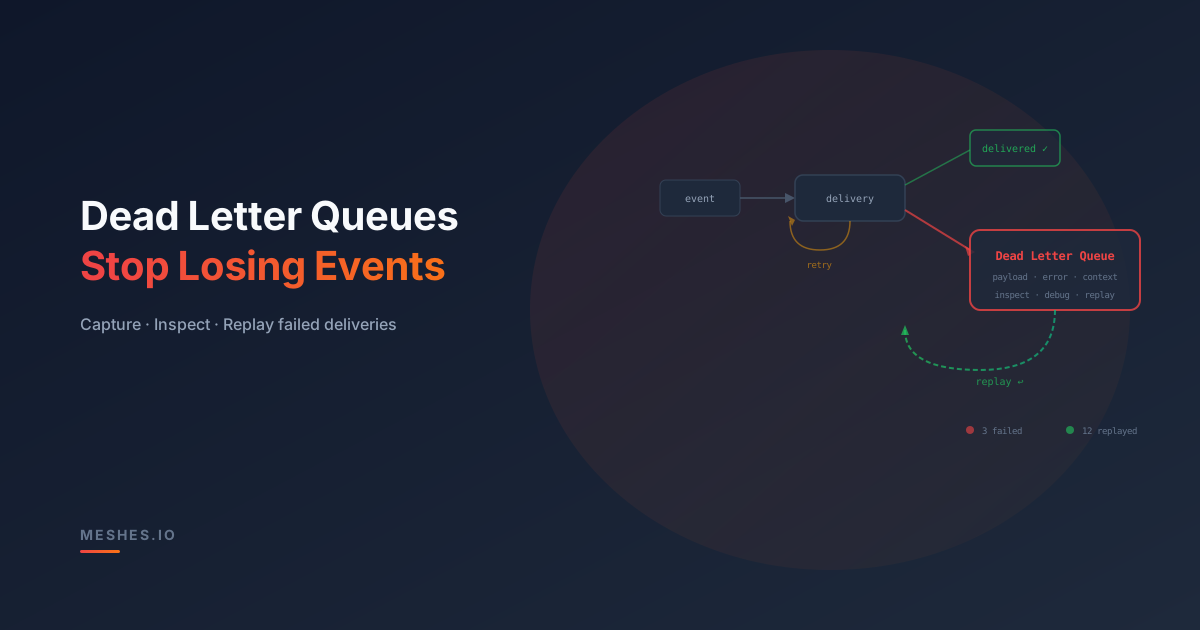
A dead letter queue prevents lost webhook events by changing the final failure behavior from discard to quarantine.
The recovery path is simple:
The retry engine attempts delivery until the retry policy is exhausted.
The failed event moves to durable storage instead of disappearing.
The DLQ keeps the payload, destination, tenant, error history, attempt count, and timestamps together.
The customer or operator fixes the endpoint, credentials, rate limit, or payload issue.
Replay sends the preserved event again with an audit trail of what happened.
That is the core difference. Retries answer "should we try again now?" A DLQ answers "what do we do when trying again did not work?"
What is a dead letter queue?
A dead letter queue (DLQ) is where events go when delivery has failed and all retry attempts are exhausted. Instead of silently discarding the event, you park it in a durable store where it can be inspected, debugged, and replayed.
The name comes from postal services: a "dead letter office" handles mail that can't be delivered to the intended recipient. The letter isn't destroyed—it's held until someone figures out what went wrong.
In webhook delivery, a DLQ serves the same purpose. When an event can't reach its destination after multiple retries, it moves to the dead letter store with context: the original payload, the destination, the failure reason, the number of attempts, and the timestamp of each attempt.
This transforms a silent failure into an actionable one. Instead of "the event disappeared," you get "the event failed to deliver to webhook X after five attempts, last error was HTTP 503, and here's the full payload ready to replay."
Why retries alone aren't enough
Retries handle transient failures: a momentary network blip, a destination that's briefly overloaded, a timeout that resolves on the next attempt. With exponential backoff, most transient failures resolve within a few retry cycles.
But some failures aren't transient:
The destination URL is wrong. A customer typos their webhook endpoint. Every delivery fails with a DNS resolution error. No amount of retrying will fix it.
Credentials expired. The OAuth token for a CRM integration expired and the customer didn't re-authorize. Every delivery fails with a 401.
The destination is permanently down. The customer shut down a server or deprecated an endpoint. The URL returns 404 indefinitely.
Payload schema mismatch. Your event includes a field the destination rejects. Every delivery fails with a 400. Retrying the same payload won't change the result.
In all of these cases, retries eventually exhaust. What happens next is what separates reliable systems from unreliable ones.
Without a DLQ, the event is gone. With a DLQ, the event is preserved, visible, and replayable once the root cause is fixed.
Retries vs dead letters vs replay
Retries, dead letters, and replay are separate parts of one recovery path:
Mechanism
When it runs
What it protects against
Retry
Before the delivery policy is exhausted
Temporary outages, timeouts, and rate limits
Dead letter
After retries stop or a permanent failure is known
Silent loss of the event and its delivery context
Replay
After the destination or configuration is fixed
Permanent data gaps after the original delivery window
A retry policy decides whether another automatic attempt is useful. Dead-letter handling preserves the failed delivery when automatic attempts no longer help. Replay is the deliberate recovery action after the URL, credentials, mapping, payload, or destination has been corrected.
What a good DLQ implementation looks like
Not all dead letter queues are created equal. A useful DLQ provides more than a dumping ground for failed events.
Full event context. Store the complete original payload, the destination that failed, the event type, the workspace or tenant, and the error details from each delivery attempt. Without this context, debugging is guesswork.
Searchability. You need to find dead letters by tenant, by destination, by event type, and by time range. A DLQ that requires you to grep through raw files or scroll through an unsorted list is barely better than no DLQ at all.
Replay capability. The single most valuable feature of a DLQ: the ability to re-deliver dead-lettered events once the underlying issue is fixed. Replay should be available per-event (retry this one event) and in bulk (retry all dead letters for this destination in the last 24 hours).
Alerting. A growing dead letter count is a signal. Alert on sudden spikes (a destination went down), sustained volume (a credential expired), and per-tenant anomalies (one customer's webhook is misconfigured).
Retention policy. Dead letters shouldn't live forever. Define a retention window—thirty days is common—after which unresolved dead letters are archived or purged. But don't make the window too short: if a customer doesn't notice the issue for a week, you need the events to still be there.
The cost of not having a DLQ
The real cost isn't technical. It's operational.
Lost revenue. If you're syncing leads to a CRM and events are lost, your customer's sales pipeline has holes. They don't know about leads that entered their funnel. Deals fall through the cracks.
Broken trust. When a customer discovers data loss, they lose confidence in your integration. If it happened once, they'll assume it can happen again. Rebuilding that trust is expensive.
Debugging black holes. Without dead letters, debugging delivery failures is forensic work. You're reconstructing what happened from application logs, queue metrics, and timestamps. With dead letters, you open the DLQ, find the failed event, and see exactly what went wrong.
Manual reconciliation. When events are lost, someone has to manually re-enter the data or build a one-off script to backfill. This is slow, error-prone, and doesn't scale.
Common DLQ mistakes
Even teams that implement dead letter queues often make mistakes that reduce their effectiveness.
DLQ with no replay. You store failed events but provide no mechanism to re-deliver them. The DLQ becomes an archive of regrets rather than a recovery tool.
Global DLQ with no scoping. All dead letters from all tenants and all destinations land in one undifferentiated queue. Finding one customer's failed events requires filtering through thousands of unrelated entries.
No alerting on DLQ growth. Dead letters accumulate silently. Nobody notices until a customer complains—sometimes days or weeks later. By then, the retention window may have expired.
DLQ as a substitute for good retries. Some teams implement minimal retries (one or two attempts) and lean on the DLQ to catch everything else. This creates noise: the DLQ fills up with events that would have succeeded with a proper retry policy. Save the DLQ for genuinely undeliverable events.
How Meshes handles failed deliveries
Meshes records delivery status per destination, retries failures that can recover, and keeps exhausted deliveries available for investigation and replay. A failure in one connection does not erase the parent event or hide what happened to the other destinations.
In the event detail experience, an authorized workspace user can inspect the attempt history and outcome, correct the connection, mapping, credentials, or endpoint, and retry the failed delivery. The original event remains the source of truth for that recovery path, so the user does not need to reconstruct a missing payload from application logs.
Your application still emits the product event once through the public Events API:
The emitting code does not change when a destination later fails. Meshes preserves the delivery history and retry path, while the workspace owner fixes the destination-specific cause.
When to add a DLQ to your integration stack
If you're sending webhooks or pushing data to external systems, you need a dead letter queue. The question isn't whether you'll have delivery failures—it's when, and whether you'll be able to recover.
Add a DLQ when:
You have any production webhook integration. Even one destination with one customer is enough to justify it.
You're seeing "missing data" support tickets and can't explain them. A DLQ turns mystery into traceability.
You're building customer-facing integrations. If your customers configure their own endpoints, they will misconfigure them. A DLQ catches the fallout.
You want to offer delivery guarantees in your SLA. You can't promise reliable delivery without a recovery mechanism for failed events.
Webhook DLQ FAQ
What should a webhook DLQ store?
Store the original event payload, event ID, destination, workspace or tenant, delivery attempts, final error, retry policy, timestamps, and enough request/response context to debug safely. Without the original payload and destination context, replay becomes guesswork.
When should an event move to the DLQ?
Move an event to the DLQ only after retryable failures have exhausted the configured retry policy or after a permanent failure makes more retries pointless. A 400 payload rejection, missing credentials, or bad destination URL usually needs a fix before replay. A transient 503 should normally get retries first.
How do you replay DLQ events safely?
Replay after the root cause is fixed, keep the original event ID stable, and make the destination path idempotent. That prevents replay from creating duplicate side effects when an earlier attempt partially succeeded.
Stop losing events
Every webhook failure without a DLQ is a silent data loss. Every silent data loss is a support ticket waiting to happen. Every support ticket erodes the trust you've built with your customer.
A dead letter queue turns unrecoverable failures into recoverable ones. Paired with a solid retry engine, it's the difference between "we lost your events" and "we caught the failure and here's every event ready to replay."
Meshes gives you DLQs, retries, backoff, and per-destination observability out of the box—so you can stop losing events and start guaranteeing delivery.
Tired of losing events to failed webhooks?Join Meshes and get dead letter management, retries, and replay built in.