The 15-minute sync trap: when native CRM integrations aren't real-time
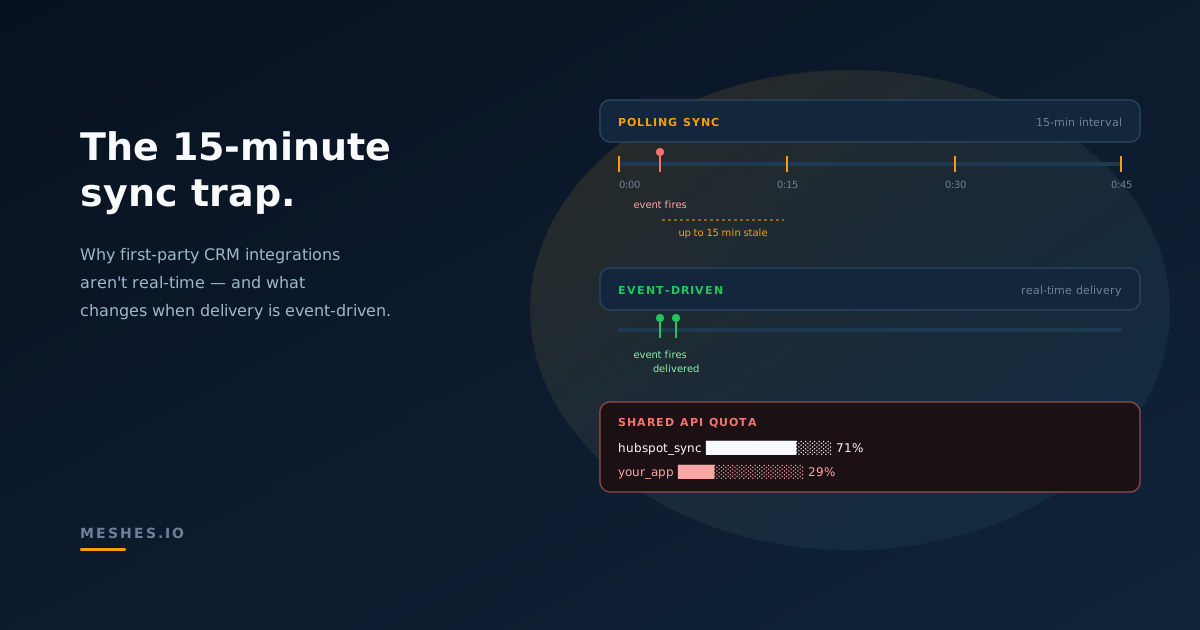
Native CRM-to-CRM integrations run on polling intervals and share API quotas with every other integrated tool. Here's why your real-time product has a 15-minute freshness floor — and what changes when delivery is event-driven from the product side.
When a user signs up in your product, how long until that signup shows up in your CRM? If the connection between the two is a vendor's built-in integration, the honest answer is usually "somewhere between right now and fifteen minutes." In practice, that means the worst case is often the documented sync interval, not the speed of the original product event.
This is the 15-minute sync trap. It isn't a bug, and it isn't a flaw in any one product. It's a common architectural baseline for native sync integrations between large SaaS platforms. The trap is that teams design their product around the assumption of fresh CRM data and only discover the polling floor later — usually after a customer asks why a sales rep saw an outdated lead status, or why a churn-prevention workflow fired four minutes too late.
The trap has three parts: polling intervals, shared API quotas, and triggering fields. Each is a reasonable architectural choice in isolation. Together, they decide what your real-time product can actually do.
Why native CRM integrations run on polling intervals
A polling-based integration checks for changes on a fixed schedule rather than reacting to events as they happen. The HubSpot–Salesforce integration, for example, includes a documented 15-minute check cycle. Many native CRM-to-CRM and app-to-CRM syncs still rely on scheduled checks, often measured in minutes rather than seconds.
There are good reasons for this. Vendors maintaining integrations on behalf of tens of thousands of customers are operating at a scale where opening a hot event subscription for every tenant isn't free. Polling lets the integration vendor batch reads, predict load, smooth spikes, and stay within rate limits that the destination platform sets. It's a coordination decision, not a capability one.
The cost is freshness. Anything that depends on the integration being current — lead routing, support context, billing automations, real-time scoring — inherits the interval as a floor. A two-second product event still takes up to fifteen minutes to show up downstream.
In May 2026, HubSpot publicly announced that it was rebuilding its Salesforce integration. The company noted that the backend data architecture supporting roughly 11,000 customers syncing daily was last refactored in 2014, and that the team had kicked off a major project to overhaul it. HubSpot's announcement is a useful public example of how much complexity sits under mature CRM sync infrastructure.
How shared API quotas turn one integration's load into another integration's outage
The second part of the trap is less obvious. Most CRM APIs apply a daily request budget per customer account, and that budget is shared across every tool that calls the API on behalf of that customer.
Salesforce, for example, applies a per-org daily API call limit. If any sync-heavy integration consumes too many calls, the remaining budget for the day shrinks for every other integrated tool — marketing automation, support, analytics, custom internal scripts. The failure mode is unrelated apps breaking because someone else's integration was busy.
This coupling is invisible until it isn't. A team that ships a new sync-heavy integration on Monday can find a customer escalating on Tuesday about an unrelated app — a webhook delivery tool, a data sync service, an internal reporting job — that suddenly started returning rate-limit errors. The root cause is the shared quota; the symptom is somewhere else entirely.
For products designed around the assumption of integration freshness, this turns into a planning constraint: you have to budget not just for your own API calls, but for the share you can reliably claim against the customer's other tools. Some teams handle this with backoff and call accounting. Most discover the problem in production.
Why not every field change triggers a sync
The third part of the trap is field-level. In the HubSpot–Salesforce integration, sync behavior depends on documented triggers, eligibility rules, and field mapping settings. That means not every field behaves the same way — some changes may not propagate until the record is otherwise eligible to sync, the mapping rules allow the update, or the record is manually resynced.
The same pattern exists in most native CRM integrations under different names: priority fields, indexed properties, change-tracked attributes. The shape is the same. Some fields get the express lane, others get the wait list, and the boundary is decided by the integration vendor's view of what most customers need most often.
This is the gap that produces the most surprising bugs. A team's product writes a field to the CRM. The field appears stale to a downstream user. The team's CRM admin checks the integration and sees recent sync activity. The activity is real — it's just that nothing the team cares about is in the express lane. The polling interval and the triggering-field rules compound: the floor on freshness is the slower of the two, and it's not the one teams usually think to measure.
What the freshness floor costs you
Polling intervals, quota coupling, and triggering rules combine into a single number for your product: the worst-case time between a user's action and that action being visible in your CRM. Some product decisions can live with that number; others can't.
Use cases that survive a 15-minute floor include weekly reporting, batch lead scoring, end-of-day reconciliations, and most marketing automation built around longer-cycle campaigns. None of these are time-sensitive enough to feel the lag.
Use cases that don't survive include real-time lead routing on form submissions, sales rep notifications on intent signals, support context that updates as a customer takes actions, and any billing or trial workflow where the gap between a product event and a CRM-driven action matters. For these, the integration's polling interval becomes the user-facing latency.
Teams hit this in two ways. Some discover it during a feature design review, draw the timing diagram, and conclude that the integration won't carry the use case. Others ship anyway, watch a few customers escalate, and then either rebuild the integration path or scope the feature down to live within the floor.
What event-driven outbound delivery changes
The alternative to polling is for the source product to emit events as they happen and deliver them to the destination directly. Instead of the destination integration checking the source on a schedule, the source pushes each change in real time.
This reverses several of the constraints. The polling-based freshness floor disappears, because there's no scheduled check interval. The shared API quota matters less, because the source controls when calls are made and can spread them across destinations rather than batching them through a single sync window. The triggering-field distinction stops mattering, because every change is a distinct event with its own delivery path.
What you take on in exchange is the delivery infrastructure that the polling integration was quietly providing. The source product is now responsible for retries on destination failures, idempotency keys that prevent duplicates during retries, dead-letter handling for events that exhaust retries, ordering guarantees where the use case demands them, and visibility into what was delivered, what wasn't, and why. These are the same problems any reliable distributed-event system has to solve. The difference is that with event-driven outbound delivery, your team owns the trade-offs explicitly instead of inheriting whatever choices the integration vendor made years ago.
When polling is the right answer and when it isn't
Polling is the right answer when freshness doesn't matter. Reporting pipelines, slow-changing reference data, scheduled aggregations, and bulk reconciliation jobs are all good candidates. The polling integration vendor is doing real work on your behalf, and replacing that work with a custom event pipeline trades freshness you don't need for operational burden you didn't have.
Event-driven delivery is the right answer when the time between a product event and downstream action is a user-visible feature. If the value proposition of the feature includes the word "real-time," "instant," "live," or "immediate," polling almost certainly can't carry it. The 15-minute floor is the test: if your feature still works when the worst case is fifteen minutes, polling is probably fine. If it doesn't, the floor is the problem and no amount of optimization inside the polling integration will lower it.
A useful intermediate approach is hybrid. Use polling for the bulk of the historical and reference data; use event-driven delivery for the small set of fields that need to be fresh. Most teams arrive at this split eventually, but the order matters: teams that start with event-driven for the time-sensitive fields and add polling later for the rest tend to ship faster than teams that start with the full polling integration and try to bolt on real-time paths.
The sync architecture is being modernized
HubSpot's v2 project does not mean every CRM sync is becoming event-driven overnight. But it does show that mature native integrations are being reworked because the old sync engines are carrying more data, more objects, and more customer expectations than they were originally designed for.
For product teams, the practical question is whether to wait for vendor rebuilds to land — timelines for these projects typically span quarters, sometimes years — or to take ownership of the event delivery path now. The right answer depends on how much of the product's value depends on freshness. For teams where the integration is a nice-to-have, waiting is reasonable. For teams where the integration is the feature, the floor is the ceiling, and waiting means living under it.
Meshes is the outbound event routing layer for SaaS products that need event-driven delivery to CRMs, support tools, and the rest of the stack — without rebuilding retry, idempotency, and delivery infrastructure from scratch.Start free
Frequently asked questions
Why do native CRM syncs often run on intervals? Polling on a fixed interval lets the integration vendor manage load, stay within the destination platform's API rate limits, and operate predictably across a large customer base. Fifteen minutes is a common interval for native CRM-to-CRM integrations, but the underlying pattern — polling on a schedule rather than reacting to events — is more general than the specific number.
What is a polling-based integration? A polling-based integration checks for changes on a schedule rather than receiving notifications when they happen. The integration runs a sync job at a fixed interval, queries the source system for what's changed since the last run, and writes those changes to the destination. The opposite is event-driven delivery, where the source emits each change as it occurs and the destination receives it immediately.
How does the Salesforce daily API call limit work? Salesforce applies a per-org daily API request limit that is shared across every integrated tool calling the Salesforce API on behalf of that org. The limit is set by the customer's edition and license count. Tools that consume a large share of the budget can cause other integrated tools to start hitting rate-limit errors before the day ends.
Can I make HubSpot sync to Salesforce in real time? The native HubSpot–Salesforce integration includes a documented 15-minute check cycle, and that cycle affects many changes depending on sync triggers, eligibility rules, and field mapping settings. HubSpot has publicly announced a rebuild of this integration. Outside the native integration, real-time delivery between the two systems is possible but requires the source product to emit its own events and route them directly.
Why don't all field changes sync immediately? Many native CRM integrations distinguish between changes that trigger sync behavior and changes that only propagate when the record is otherwise eligible to sync. The result is that some field changes propagate within the interval and others wait until the record qualifies or is manually resynced.
What's the difference between event-driven delivery and webhooks? Webhooks are a transport mechanism for delivering events from one system to another. Event-driven delivery is an architectural pattern in which a product emits events as they happen and routes them to one or more destinations, often using webhooks as the transport. A webhook by itself doesn't make an integration event-driven; the source has to be designed to emit events at the moment of the change rather than collecting them for a scheduled sync.